
VSD Mini Macro Pad
4.1Editor score
6 customizable LCD keys
Compact portable design
Dual side RGB lighting
USB powered operation
This guide compares the top macro pads for streaming including VSD Stream Deck, Fifine, Streonor, and Elgato for OBS control and workflow automation.
Streaming professionals need efficient tools to manage complex workflows during live broadcasts. A macro pad for streaming allows creators to trigger multiple actions instantly without cluttering their keyboard. These devices streamline scene switches, media controls, and chat interactions for smoother production.
We evaluated ten top-rated macro pads based on key customization, software compatibility, build quality, and streaming-specific features. Our analysis covers devices from budget-friendly options to premium controllers with audio mixing capabilities. Each product was assessed for reliability with OBS, Streamlabs, and major social platforms.
Each pick highlights unique strengths like LCD keys, RGB lighting, and plugin ecosystems. Readers will find detailed specifications, pros, cons, and usage scenarios for every device. Please note that product availability and pricing may vary by region and time. Always check current listings before purchasing.
4.1Editor score

4.8Editor score

4.4Editor score
The following table provides a side-by-side comparison of all ten macro pads. It highlights key specifications including key counts, screen types, compatibility, and unique features to help you make an informed decision.


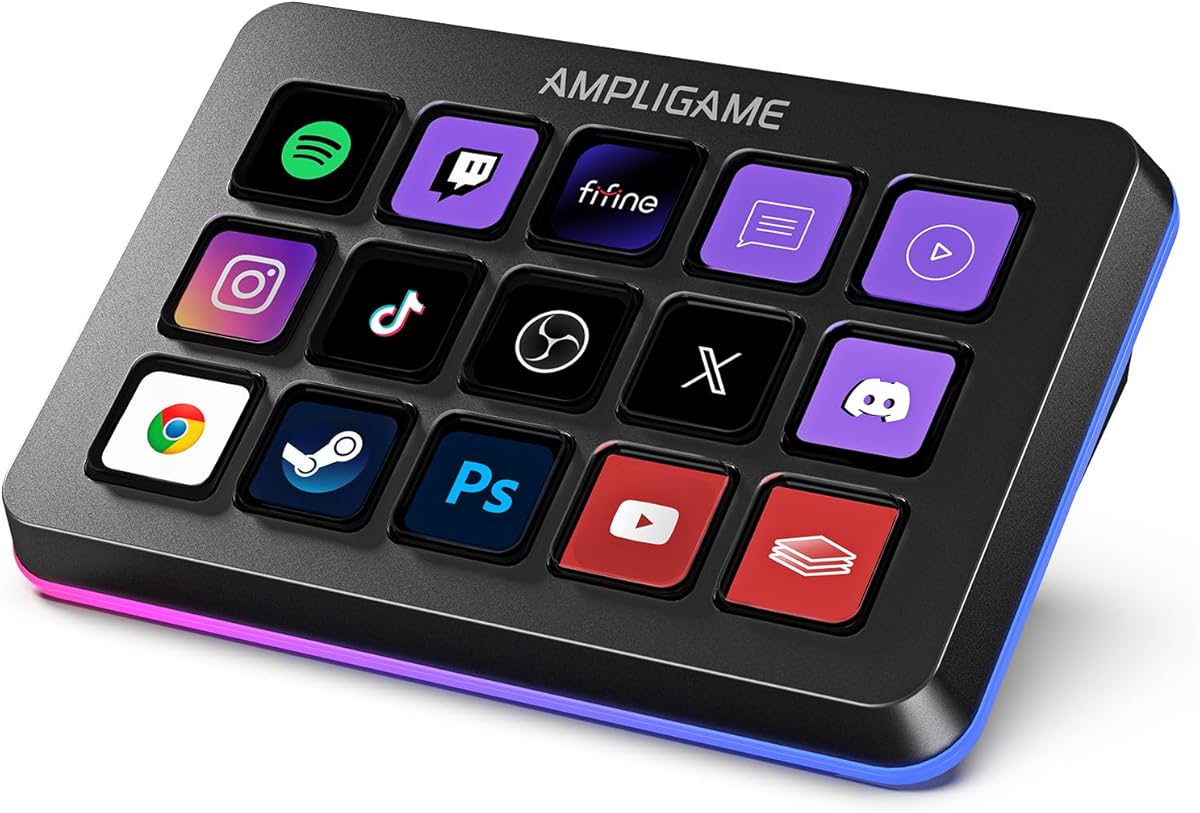


The VSD M18 Macro Pad stands out as a top contender for streamers seeking high value. It offers 18 programmable keys including 15 LCD visual keys and 3 physical buttons. With a strong rating and comprehensive features, it enables users to trigger actions in OBS, Twitch, and YouTube efficiently.
We may earn a commission when you buy through this link, at no additional cost to you.
Its single tap control simplifies complex workflows allowing users to switch scenes or launch apps instantly. The adjustable RGB surround light ring enhances desk ambiance for dim gaming or streaming setups. Compatible with Windows and macOS it integrates seamlessly with OBS, Discord, Excel, and Photoshop.
While it requires firmware upgrades for custom RGB tones and lacks native Linux support, these trade-offs are minimal for most users. The solid construction and built-in plugins like clock and weather ensure stable long-term operation without needing external apps.
Streamers and gamers who need extensive macro control without high costs should consider this device. Its one tap multi shortcut function supports custom sequences for gaming combos or video editing. The combination of visual feedback and physical durability makes it a reliable daily tool.
Users can upload JPG PNG and GIF images to LCD keys for clear function recognition during fast-paced streams.
The Operation Follow function runs multiple macro steps in custom order to automate repetitive tasks across different software applications.
We may earn a commission when you buy through this link, at no additional cost to you.
The Stream Dock N1 adopts a unique vertical layout to save valuable desktop space while expanding shortcut keys. It features 15 LCD keys and three practical switchable modes including calculator and numeric keypad. Its high rating reflects satisfaction with its ergonomically shaped design for left-hand operation.
We may earn a commission when you buy through this link, at no additional cost to you.
Customization is key here as users can drag files browsers apps and images to keys for one-click access. The plugin marketplace offers hundreds of plugins for schedule reminders and weather. It works seamlessly with OBS PowerPoint YouTube and Adobe Premiere Pro for smoother workflows.
While the vertical design may not suit right-handed users as easily the calculator mode offers unique utility without software. The extensive plugin support allows optimization of mainstream apps though reliance on the store may limit offline functionality.
Creators needing extra desk space or unique left-hand access will find this deck useful. The 24-month warranty provides peace of mind for long-term use. With tutorials available online setup remains straightforward for both new and experienced users.
The vertical layout reduces horizontal footprint allowing more room for monitors and peripheral devices on crowded desks.
Available plugins include icons packs and widgets that extend functionality beyond basic macros for personalized productivity.
We may earn a commission when you buy through this link, at no additional cost to you.
The VSD M18 Stream Controller offers 18 customized macro keys to streamline workflows for gamers and professionals. It includes 15 visual LCD keys and 3 physical buttons with support for JPG PNG and GIF animations. Its rating indicates consistent performance in triggering macros and app launches.
We may earn a commission when you buy through this link, at no additional cost to you.
One-touch operation allows instant scene switches in OBS or media control without complex settings. The surrounding RGB light ring adds a visually stunning atmosphere for dark streaming setups. It integrates with popular software like Streamlabs Discord Excel and Photoshop across Windows and macOS systems.
Although it does not support plug-and-play on Linux it provides SDK development for custom secondary development. High-grade materials ensure long-lasting performance while built-in plugins like weather and calendar assist daily desktop operations effectively.
Content creators looking for robust macro functionality should find this controller reliable and efficient. The ability to execute multiple operations simultaneously via the Operation Follow feature enhances task control. Its durable build and wide compatibility make it a solid daily tool.
Users can set chained operations that execute multiple tasks in sequence for complex gaming or editing workflows.
Dynamic icons on LCD keys confirm active states helping users avoid mistakes during high-pressure streaming moments.
We may earn a commission when you buy through this link, at no additional cost to you.
The VSD Mini Macro Pad is an ideal budget-friendly choice for users with limited desk space. It features 6 fully customizable LCD visual keys and dual side RGB light bars for ambiance. Its compact design allows portability while retaining full macro customization functions for various scenarios.
We may earn a commission when you buy through this link, at no additional cost to you.
One-tap shortcut execution streamlines workflows by switching OBS scenes or launching apps instantly. The exclusive VSD Craft software enables setting images GIFs and commands for daily operations. It works with Windows macOS via USB connection and supports mainstream apps like Office and Photoshop.
With fewer keys than larger pads it suits simple workflows rather than complex multi-step sequences. Linux users can adapt via open-source SDK files though native plug-and-play is not available. Its USB powered design ensures continuous power without battery interruptions.
Beginners or those seeking a minimal macro controller will appreciate its value and simplicity. The premium build materials support stable long-term use in gaming or office environments. Professional customer service and free updates add further reliability for daily operation.
The mini size fits seamlessly into existing desktop setups without overwhelming available space or cluttering the workspace.
Despite the low cost users can still personalize keys with images and animations for efficient recognition during use.
We may earn a commission when you buy through this link, at no additional cost to you.
The VSD N4 Pro delivers premium features tailored for serious content creators and audio studios. It includes 10 fully configurable hotkeys plus 4 RGB knobs and an interactive touch bar. Its design allows custom PNG/JPG/GIF icons and unlimited scene presets for streaming editing and office use.
We may earn a commission when you buy through this link, at no additional cost to you.
As a USB sound deck it lets streamers trigger sound effects and adjust audio atmosphere with one tap. The plugin ecosystem offers 500+ official plugins to automate tasks like batch processing and live production. Carbon-fiber panels and switchable haptic keys provide premium customization and typing feedback.
It does not include built-in speakers so audio commands trigger the computer rather than outputting sound directly. However the adjustable ergonomic stand ensures comfort during long sessions. The built-in passive USB dock adds extra ports for storage drives and peripherals seamlessly.
Professionals needing both macro control and audio management will find this controller unmatched in versatility. Cross-platform compatibility with Windows and macOS ensures flexibility for diverse setups. Its foldable design and visual aesthetics make it a high-end addition to any desk.
Integrated audio commands allow quick adjustments to background tracks and sound effects without interrupting stream flow.
The foldable stand supports comfortable viewing angles reducing wrist strain during extended streaming or editing sessions.
We may earn a commission when you buy through this link, at no additional cost to you.
The fifine D6 RGB Macro Keyboard features 15 customizable macro keys designed for multi-tasking scenarios. It allows users to launch software switch OBS scenes and control audio levels through simple finger presses. Its visual operation keypad improves efficiency by reducing the need for open windows.
We may earn a commission when you buy through this link, at no additional cost to you.
Compatibility is broad supporting OBS Studio Streamlabs Twitch YouTube and various plugins. Users can drag-and-drop icons to customize their setup easily. The vivid RGB lighting with 9 controllable modes enhances gaming setups and matches personal preferences for a dynamic impression.
While it requires software updates for full functionality this ensures optimal performance. The visual feedback on the touchscreen provides clarity during operation. Folders can be created to generate different programs for independent scene processing across different tasks.
Users balancing gaming streaming and office work will benefit from its versatile multi-tasking scenes. The wide range of plugins and icons allows personalized workflows without extensive coding. Regular updates and visual cues make it a reliable tool for varied demands.
The touchscreen displays active commands so users see exact operations without switching away from their main screen.
Folders organize different programs allowing independent processing of tasks without interference between workflows.
We may earn a commission when you buy through this link, at no additional cost to you.
The TreasLin N1 offers 18 macro keys with three different operation modes for added flexibility. It combines 15 visual LCD buttons with 2 clickable buttons and a rotary knob. This setup allows quick switching between shortcut key calculator and numeric keypad modes for diverse daily needs.
We may earn a commission when you buy through this link, at no additional cost to you.
Dynamic icons break new ground by supporting animated GIFs rather than static images. This transforms the interface into a vibrant personalized tool. The VSD Craft software lets users freely assign functions with drag-and-drop customization. An extensive marketplace provides thousands of free options for Discord and Twitch.
Spotify integration requires an active Premium account which may limit free users. However daily modes and live streaming controls offer specialized workflows for common tasks. Technical support remains prompt for any setup issues during initial use.
Streamers and podcasters needing versatile control across multiple apps will find this deck highly adaptable. The animated icons enhance recognition and personality on the desk. With quick control scenarios it reduces repetitive clicks and keeps tools accessible during long sessions.
Dynamic support allows animated icons that add personality and improve visual recognition during complex workflows.
Dedicated modes for daily work and live streaming organize functions to reduce cognitive load during production.
We may earn a commission when you buy through this link, at no additional cost to you.
The Streonor S15 gives users 15 customizable LCD keys for everyday control including shortcuts and app actions. Uniquely it includes 3 status display panels for real-time information like weather CPU temperature and memory usage. This keeps creators informed while working without switching windows.
We may earn a commission when you buy through this link, at no additional cost to you.
Action flows allow triggering multiple commands with a single key press for efficiency. Users can build dedicated layouts for streaming editing office work or gaming. The software store offers 100+ plugins and custom tutorials to personalize workflows extensively.
Linux is not supported and setup requires uninstalling similar software to avoid conflicts. Direct USB connection is recommended for stability. Some third-party services need active accounts which is standard for advanced integrations.
Creators needing system status visibility will appreciate the status display panels on this deck. The ability to create scenario-specific pages streamlines transitions between work modes. It balances productivity features with intuitive control for both beginners and advanced users.
Display panels show CPU temperature and memory usage so users monitor system performance during high-load streaming.
Users can chain multiple commands into one action flow to automate complex sequences without repetitive keystrokes.
We may earn a commission when you buy through this link, at no additional cost to you.
The Streonor S10 Pro brings together 10 LCD keys an integrated touchscreen and 4 programmable rotary knobs. It serves as a premium creator console for instant commands and precise adjustments. This design is ideal for streamers editors and multitaskers needing direct control over audio and actions.
We may earn a commission when you buy through this link, at no additional cost to you.
Knobs can be assigned to volume microphone levels and media playback adjustments for fine control. The touchscreen provides supported information and controls reducing the need for multiple windows. It supports build faster multi-action workflows by assigning several actions to one key.
Linux is not supported which may limit open-source workflow users. Some third-party services require active accounts though most plugins work directly. The S10 Pro works as a central controller reducing window switching during demanding sessions.
Professionals managing both audio mixing and scene changes will find this controller highly efficient. The dedicated profiles for OBS Twitch and video editing keep tools accessible. Its high rating reflects satisfaction with the seamless integration of touch and macro controls.
Knobs provide precise adjustments to mic levels and media playback without navigating complex software menus.
The console reduces window switching by keeping all essential tools accessible on one physical device.
We may earn a commission when you buy through this link, at no additional cost to you.
The Elgato Stream Deck MK.2 is an industry standard for controlling apps tools and platforms. It features 15 customizable LCD keys for instant commands with visual feedback confirming execution. Its high rating reflects consistent reliability for professional streaming and production workflows.
We may earn a commission when you buy through this link, at no additional cost to you.
One-touch operation triggers multiple actions like launching social posts adjusting audio or turning on lights easily. The plugin ecosystem supports OBS Twitch YouTube and many more for deep integration. Hotkey actions streamline workflows for film editing music production and photography.
It requires a USB connection for power and data which ensures stability but may use a port. The price point is higher than competitors yet the plugin support and build quality justify the investment. Visual feedback eliminates guesswork during critical moments.
Streamers who value reliability and extensive software support should choose this controller confidently. Its one-touch capabilities and visual confirmations enhance efficiency across diverse platforms. It remains the top choice for professionals seeking seamless platform control.
Visual feedback on every command execution ensures creators know exactly when actions are triggered during live shows.
Extensive plugins integrate with major platforms allowing deep control over external apps without complex coding.
We may earn a commission when you buy through this link, at no additional cost to you.
Selecting the right macro pad requires balancing key count customization and software needs. This guide covers essential factors to ensure you find a device that fits your streaming workflow.
The number of keys determines how many commands you can access instantly. Larger pads offer 15 keys or more while compact options provide 6 to 10 keys. Consider your screen space and workflow complexity when choosing layout and size.
Prioritize key counts that match your typical number of frequent actions to avoid overloading the device.
LCD keys allow you to upload images GIFs and animations for clear visual recognition. Customization improves efficiency by letting you identify functions at a glance during streams. Check if the software supports drag-and-drop image editing for ease of use.
Choose models with flexible image formats to ensure your icons remain clear and functional.
Ensure the macro pad works with your primary streaming software like OBS Streamlabs or Twitch. Native plugins save time by automating tasks without external scripts. Verify operating system support for Windows macOS and Linux before purchasing.
Confirm that the device integrates with your existing tools to prevent workflow interruptions.
Some pads include audio mixing capabilities like sound decks or volume knobs. These features reduce the need for separate audio interfaces during live production. Look for models with USB sound board functions if audio control is critical.
Opt for controllers with dedicated audio controls if you manage sound effects during streams.
RGB lighting adds ambiance to your desk setup and improves visibility in dim environments. Adjusting tones helps match your brand or mood for professional visuals. Check if customization allows color cycling or specific tones for your style.
Select lighting options that enhance your setup without distracting from main content.
Robust construction ensures the device withstands frequent use over long periods. Look for sturdy materials and stable connections to prevent hardware failures during critical streams. A solid build also improves tactile feedback for precise macro triggers.
Prioritize devices with proven durability to minimize risks of interruption.
Some macro pads require dedicated software for customization while others offer plug and play. Dedicated software often provides deeper features but may need initial installation. Weigh convenience against advanced functionality based on your comfort with setup.
Choose setups that match your technical comfort level for smoother integration.
Consider the physical dimensions and shape of the device to ensure comfortable usage. Vertical or angled designs can reduce desk clutter and wrist strain. A well-sized device allows easy access during fast-paced streaming without reaching.
Prioritize ergonomics to maintain comfort during long streaming sessions.
Begin by connecting the device via USB and installing the required software. Follow the quick start guide to assign basic functions to keys. Test simple macros like app launches or scene switches to confirm operation.
Customize keys with images or GIFs to improve recognition. Organize functions into profiles for different scenarios like gaming or editing. Save changes and restart the software to apply settings.
Keep firmware and software updated for optimal performance and bug fixes. Clean the LCD keys gently with a microfiber cloth to avoid scratches. Store the device in a dry place to protect internal components.
Yes, most macro pads work with any software or desktop task. You can assign shortcuts to launch apps or control media in any environment. This flexibility makes them useful for office work and gaming beyond streaming.
Some models require specific software for customization but basic functions may work without drivers. Check the product details to confirm plug-and-play support. Most offer dedicated software for advanced setup.
Many devices support GIF and PNG animations on LCD keys. Use the included software to upload and assign these files. This helps create dynamic icons that confirm active states.
Not all models support Linux natively; some require SDK development. Check compatibility lists before purchasing. Windows and macOS are widely supported across most options.
Most software allows resetting to default profiles or creating new profiles. Use the profile manager to clear or reassign keys. This helps when switching between different streaming setups.
Most devices are powered directly via USB cables from your computer. Built-in batteries are rare unless specified. This ensures consistent power without needing charging breaks.
The top picks include the VSD M18 for value, the Streonor S10 for audio, and the Elgato MK.2 for reliability. Each offers unique strengths tailored to different production needs and budgets. Choosing the right device enhances efficiency during live broadcasts.
Prioritize software compatibility and key customization when making your decision. Ensure the device supports your primary streaming apps and allows visual feedback. This ensures smooth workflows without technical interruptions.
Always verify current listings and availability before purchasing as specs may change. Check prices and warranty terms to maximize value for your investment. With the right choice, you can elevate your streaming setup.