
Behringer X AIR XR18
4.6Editor score
iPad and Android tablet control
16 MIDAS preamps
Built-in Wi-Fi router
This guide compares the top digital mixing consoles for live sound and studio use, evaluating features, sound quality, and ease of use.
Digital mixing consoles have revolutionized audio production by offering unprecedented control over sound in both live and studio environments. These devices integrate powerful processing, routing, and effects into a single unit, making complex mixes manageable for engineers of all skill levels.
To compile this list, we evaluated ten leading models based on their input capacity, preamp quality, interface usability, and connectivity options. Each console was assessed for its ability to handle diverse audio scenarios, from small venue performances to large-scale recording sessions.
Each pick in this guide highlights specific strengths and ideal use cases to help you find the right tool for your needs. Please note that availability and pricing can change frequently, so verify current details before making a purchase decision.
4.6Editor score

4.7Editor score

The following table provides a side-by-side comparison of the top digital mixing consoles available today, highlighting key specifications and capabilities for quick reference.




The Behringer X32 stands as a benchmark in the digital mixing console market, combining professional-grade audio quality with versatile connectivity. Its robust build and comprehensive feature set make it a favorite among touring engineers and studio professionals alike.
We may earn a commission when you buy through this link, at no additional cost to you.
Equipped with 32 MIDAS-designed preamps, this console delivers pristine clarity for any source. The 25-bus architecture allows for complex signal routing, while the 100mm motorized faders provide precise control over levels and automation.
While the learning curve can be steep for newcomers, the sheer amount of control available justifies the investment. Users often appreciate the dynamic LCD Scribble Strips which simplify channel identification during live performance scenarios.
Whether you are managing a large band setup or recording a podcast, the X32 offers the reliability and sound quality needed. It remains the top recommendation for those seeking a complete, professional digital mixing solution.
The MIDAS-designed preamps ensure low noise and high headroom, capturing every nuance of your audio source with exceptional fidelity.
Save and recall entire mixer states instantly, allowing for smooth transitions between different songs or segments of a show.
We may earn a commission when you buy through this link, at no additional cost to you.
The Yamaha DM3 Standard brings premium sound quality to a highly portable form factor. It is designed for applications where space is limited but professional audio is non-negotiable.
We may earn a commission when you buy through this link, at no additional cost to you.
Featuring a 9-inch touchscreen, the DM3 offers an intuitive interface that simplifies complex tasks. The 16 professional Yamaha pre-amps ensure that your recordings and live mixes sound polished and clear.
While it lacks the sheer scale of larger consoles, its 22-channel architecture is sufficient for many small venues and home studios. The integrated USB interface also makes recording seamless without external hardware.
This console is ideal for solo engineers or teams needing a reliable setup that fits easily into a gig bag. Its balance of size, quality, and usability makes it a standout in the compact category.
The large touchscreen allows for quick parameter adjustments and visual feedback, reducing the need for physical knobs and buttons.
A dedicated 2×2 USB recorder ensures you can capture high-quality audio directly without needing a separate computer setup.
We may earn a commission when you buy through this link, at no additional cost to you.
The Behringer WING is a powerhouse designed for large-scale productions and complex audio environments. It builds upon the legacy of previous models with enhanced capabilities and modular flexibility.
We may earn a commission when you buy through this link, at no additional cost to you.
With 48 channels and 28 buses, this console can handle intricate setups including large orchestras or festival stages. The MIDAS PRO preamps onboard ensure professional sound quality across all inputs.
Its plug-and-play remote I/O connectivity allows you to expand your input and output capabilities significantly. The capacitive touch screen and configurable sections provide a modern user experience.
For professionals managing demanding audio environments, the WING offers the scalability and power required. It is a robust choice for those who need extensive routing and high channel counts.
The flexible design allows you to customize the console to your specific workflow, adapting to various production needs efficiently.
AES50 ports with SuperMAC technology ensure ultra-low latency and jitter, critical for synchronized multi-channel audio setups.
We may earn a commission when you buy through this link, at no additional cost to you.
The Yamaha MGX12 is tailored for modern content creators and streamers who need a seamless integration of audio and video. It offers a complete package with software and hardware essentials.
We may earn a commission when you buy through this link, at no additional cost to you.
Its dual USB-C interface and 4K HDMI pass-through allow for high-quality video recording alongside audio mixing. The 4.3-inch touchscreen makes operation straightforward for users who might be new to mixing.
While it has fewer channels than full-stage consoles, it covers the essentials for podcasts and small productions. The included software suite adds significant value for those starting their production journey.
This console is perfect for home studios and streamers seeking a plug-and-play solution. Its focus on ease of use and modern connectivity makes it a strong contender for digital media creation.
The included software bundle provides essential tools for editing and production, eliminating the need for separate purchases.
HDMI pass-through ensures you can record high-quality video directly, simplifying your streaming or recording workflow significantly.
We may earn a commission when you buy through this link, at no additional cost to you.
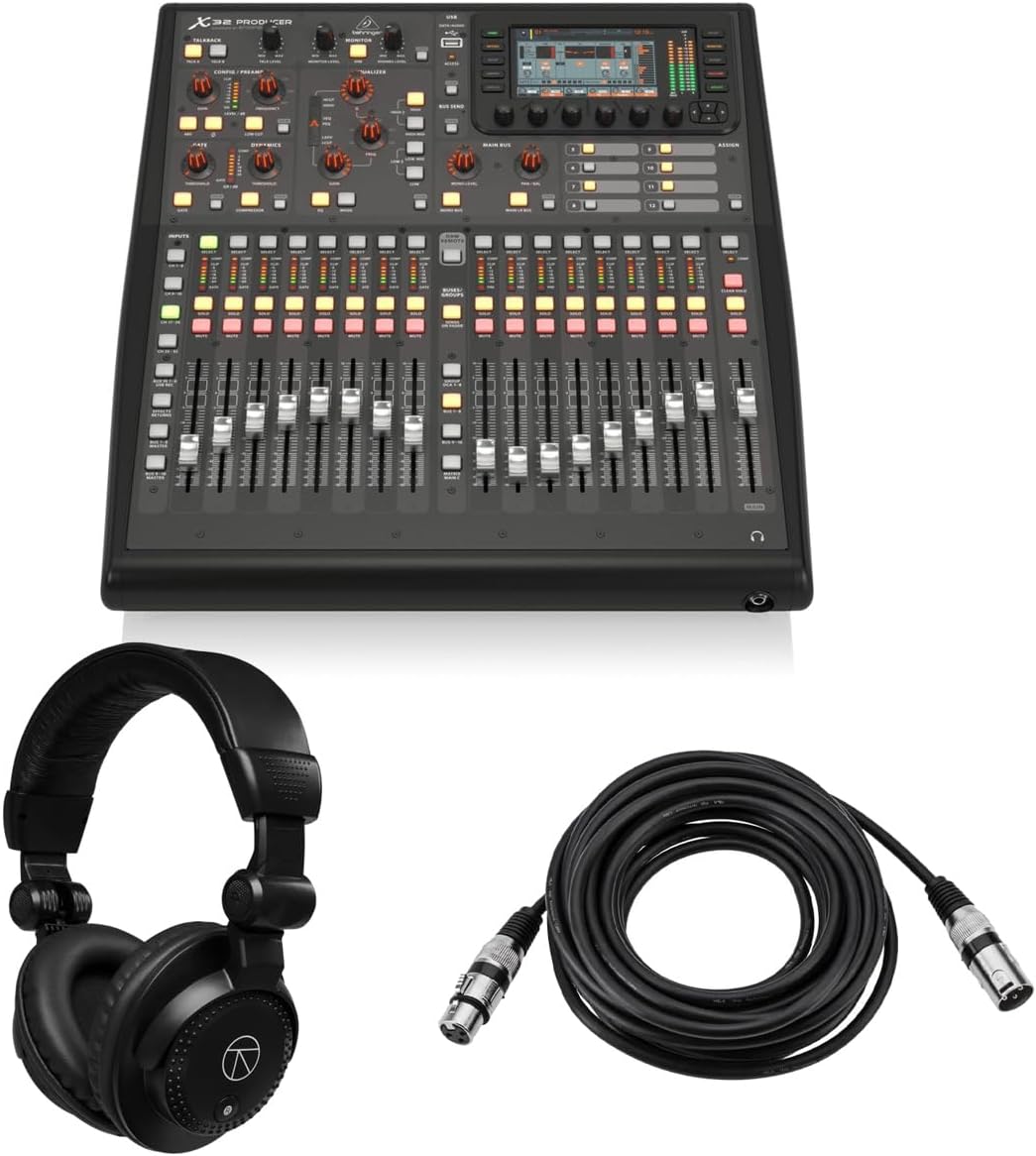
The Behringer X32 PRODUCER offers the core functionality of the flagship X32 in a rack-mountable format, ideal for studios and fixed installations. This specific bundle includes essential accessories to get started immediately.
We may earn a commission when you buy through this link, at no additional cost to you.
With 40 input channels and 16 programmable MIDAS preamps, it delivers professional sound quality. The built-in effects and 5-inch display provide all the tools needed for detailed mixing tasks.
Users appreciate the value provided by the bundled headphones and cables. The rack-mountable design saves space and protects the unit during transport or within a dedicated rack environment.
For studios or venues needing a reliable console without the bulk of a floor unit, this is an excellent choice. The included accessories make it a ready-to-use solution for audio professionals.
The rack-mountable form factor is perfect for permanent installations or transport, ensuring stability and protection for the unit.
The virtual FX rack includes high-end simulations, allowing for creative sound design without external hardware plugins.
We may earn a commission when you buy through this link, at no additional cost to you.
The BEHRINGER X32 COMPACT condenses the power of the X32 into a smaller footprint, making it ideal for smaller venues and mobile setups. It retains the essential features required for professional mixing.
We may earn a commission when you buy through this link, at no additional cost to you.
With 16 MIDAS-designed preamps and 17 motorized faders, it offers precise control and superior audio quality. The dynamic LCD Scribble Strips enhance usability, allowing for quick channel identification.
Despite its compact size, the console supports complex routing and scene management. It is a reliable choice for engineers who need professional tools without the full size of a standard console.
This model is best suited for applications where space is at a premium but quality cannot be compromised. It bridges the gap between portability and full-featured professional performance.
The compact design maintains the ergonomic layout of larger models, ensuring that familiar workflows remain efficient and intuitive.
The inclusion of MIDAS preamps ensures that the sound quality remains top-tier regardless of the reduced physical dimensions.
We may earn a commission when you buy through this link, at no additional cost to you.
The PreSonus StudioLive Classic 16.0.2 is well-regarded for its tight integration with DAWs and built-in effects. It offers a streamlined workflow for recording and mixing in the studio.
We may earn a commission when you buy through this link, at no additional cost to you.
Its Fat Channel processing provides essential dynamics and EQ on every channel, simplifying the signal chain. The USB interface supports multitrack recording, making it easy to capture all inputs separately.
While it may lack some modern features found in newer models, its reliability and software ecosystem remain strong. The free bundle of Studio One Artist and UC Surface adds significant value.
This console is a solid choice for home studios prioritizing computer integration. Its straightforward layout makes it a user-friendly option for recording engineers starting out or expanding their capabilities.
The native integration with Studio One allows for precise transport and track control directly from the console surface.
The dedicated Fat Channel provides comprehensive EQ and dynamics, reducing the need for external plugins in your mix.
We may earn a commission when you buy through this link, at no additional cost to you.
The Behringer X AIR XR18 delivers professional features at an accessible price point, making it a top pick for those on a budget. It relies on tablet control to maintain a compact physical profile.
We may earn a commission when you buy through this link, at no additional cost to you.
Equipped with 16 MIDAS-designed preamps, the XR18 ensures high-quality audio capture despite its size. The built-in Wi-Fi allows for wireless operation from any device on the network.
While the lack of physical faders may not suit everyone, the digital control offers flexibility and easy scene recall. The USB interface supports recording up to 18 channels directly to your computer.
This console is perfect for live sound, podcasting, and home studios needing remote control. It balances cost and performance effectively, making professional digital mixing accessible to more users.
The built-in Wi-Fi router enables mixing from anywhere in the room, offering unmatched freedom during live sound checks.
Even at this price point, the console retains the legendary quality of MIDAS preamps, ensuring clean and powerful input signals.
We may earn a commission when you buy through this link, at no additional cost to you.
The Allen & Heath Qu-5 represents the pinnacle of modern digital mixing, featuring FPGA processing and high sample rates. It is designed for demanding applications where sound quality is paramount.
We may earn a commission when you buy through this link, at no additional cost to you.
Its 96kHz processing ensures ultra-low latency and exceptional audio fidelity. The flexible mixing architecture allows for up to 38 inputs and customizable layers for efficient operation.
With extensive connectivity including SLink expansion, it can scale to meet the needs of large productions. The 7-inch touchscreen provides intuitive access to complex routing and effects parameters.
This mixer is best suited for professionals who need the best possible sound and performance. It justifies its premium price with robust build quality and advanced technological features.
The FPGA processing delivers fast, efficient performance without compromising on sound quality or latency during complex operations.
The USB-C multichannel interface ensures compatibility with modern systems, streamlining the recording workflow significantly.
We may earn a commission when you buy through this link, at no additional cost to you.
The QSC TouchMix-16 is renowned for its simplicity and ease of use, making it ideal for solo engineers managing their own sound. It offers a comprehensive feature set in a compact package.
We may earn a commission when you buy through this link, at no additional cost to you.
With full parametric EQ and dynamics on every channel, it provides professional sound shaping tools. The integrated bag makes transport effortless, ensuring you are ready for any gig.
While it may not match the routing flexibility of larger consoles, it covers the essentials beautifully. The auto setup features and intuitive interface reduce the time needed for sound checks.
This mixer is perfect for independent musicians, small bands, and presenters. It balances ease of use with professional sound, making it a reliable tool for mobile applications.
The interface simplifies complex tasks, allowing users to achieve professional results with minimal technical knowledge.
TRS aux outs directly drive in-ear monitors, simplifying the setup for bands needing personal monitoring solutions.
We may earn a commission when you buy through this link, at no additional cost to you.
Selecting the right digital mixing console requires understanding your specific audio needs and technical requirements. Consider these key factors to ensure you find a system that fits your workflow.
The number of channels you need depends on the size of your source. A small podcast might only need a few inputs, while a live band could require 20 or more. Always ensure the console can handle all your microphones and instruments simultaneously.
Look for consoles with enough XLR and line inputs to cover your current setup plus some growth room.
Preamps determine the clarity and noise floor of your audio. High-quality preamps like MIDAS or Yamaha XMAX capture subtle details without hiss. This is especially critical for live vocals and sensitive instruments.
Invest in a console with reputable preamp technology to ensure your recordings and mixes sound professional.
An intuitive interface saves time during sound checks and performances. Touchscreens and LCD strips help you navigate settings quickly. Physical faders are often preferred for quick adjustments.
Choose a layout that matches your operating style to reduce errors and improve efficiency.
Modern mixing requires robust connectivity. USB interfaces for recording, Ethernet for remote control, and digital outputs for multi-track recording are essential. Ensure the console supports your recording and transmission needs.
Check for compatible ports that connect with your existing computer and audio gear.
Built-in EQ, compression, and effects save time and money on external gear. Consoles with powerful internal DSPs allow you to shape sound without extra plugins. Look for comprehensive EQ curves and dynamics processing.
Prioritize consoles with versatile internal processors to streamline your workflow and reduce setup complexity.
Your needs may grow over time. Systems with remote I/O or expansion ports allow you to add channels later. This flexibility ensures your console remains useful as your projects expand.
Consider models with modular capabilities to protect your investment against future requirements.
If you move equipment often, weight and size matter. Rack-mounted or compact floor units are easier to transport. However, ensure the form factor does not compromise the ergonomics you need for control.
Select a size that balances mobility with the comfort required for long mixing sessions.
Integration with DAWs and recording software is crucial for modern production. Some consoles offer control surfaces or driver support for major software. This connection simplifies recording and editing workflows.
Verify that the console works well with the software you use to maximize your production potential.
Start by connecting your audio sources and configuring the I/O settings in the system menu. Ensure your cables are secure and set the initial gain levels for each channel to avoid clipping. Familiarize yourself with the layout using the user manual or online tutorials.
During operation, use the built-in effects and EQ to shape your sound. Save scenes for different parts of your show to recall settings quickly. Always monitor your output levels to prevent distortion and ensure clear sound.
For maintenance, keep the console clean by wiping it with a dry cloth. Store it in a cool, dry place to prevent moisture damage. Regularly update firmware to access new features and security patches.
Digital mixers use digital signal processing to manipulate audio, offering more features like recallable scenes and effects. Analog mixers use physical circuits for control. Digital mixers are generally more versatile and easier to set up for complex tasks.
Most modern digital mixers have USB audio interfaces that allow direct recording. You can record individual channels or a stereo mix. Check the specific model to ensure it supports your computer's operating system and recording software.
While digital mixers are intuitive, they do require some learning compared to analog. Manufacturers often provide tutorials. Taking a course or practicing with demo software can help you get comfortable with the workflow.
Common sample rates are 44.1kHz, 48kHz, and 96kHz. Higher rates offer better quality but require more storage. For most professional applications, 48kHz is standard for video and 44.1kHz for audio.
Many mixers feature expansion ports for additional I/O. This allows you to increase channel counts as needed. Look for systems with modular designs if you anticipate growing your setup in the future.
Start by checking cable connections and gain settings. Ensure your input sources are properly powered. Use the mute and solo buttons to isolate channels and identify where the signal loss or noise occurs.
The right digital mixing console depends on your specific audio needs and environment. The top picks offer excellent quality for various applications, from streaming to live sound.
Prioritize features that match your workflow, such as preamp quality, channel count, and ease of use. Investing in a reliable system ensures consistent performance over time.
Always verify current availability and pricing before purchasing. These consoles are essential tools for creating professional audio experiences in any setting.