
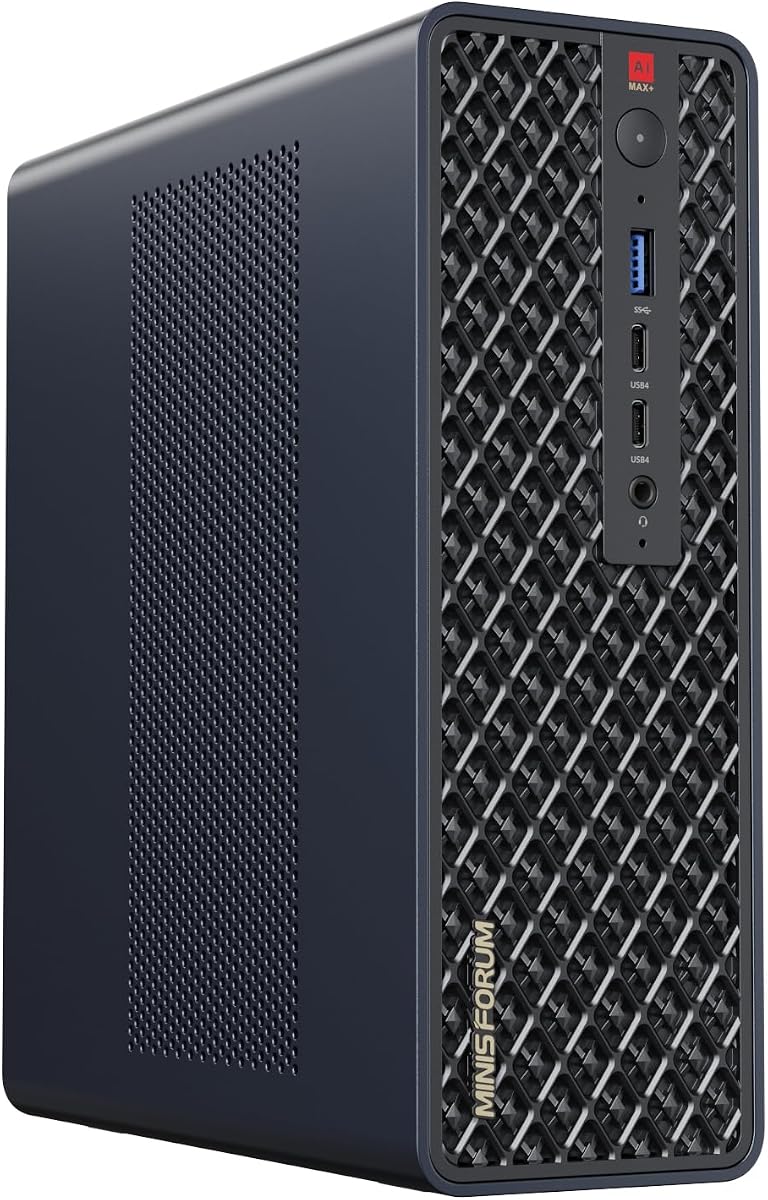
MINISFORUM MS-S1 MAX Mini AI Workstation PC
4.5Editor score
128GB LPDDR5x unified memory
Cluster capable design
PCIe x16 expansion slot
This guide compares ten powerful dual GPU AI setups for local inference and training, covering workstations, servers, and compact systems for diverse needs.
Modern artificial intelligence demands immense computational power for efficient local processing and model deployment. A dual GPU AI setup offers the necessary parallel architecture to handle large language models without relying on external cloud services.
We evaluated ten distinct configurations ranging from compact mini stations to enterprise-grade server racks. Each system was assessed on memory capacity, processing throughput, and compatibility with major AI frameworks.
Every pick highlights specific strengths for different workloads. Note that availability and configurations may change frequently. Always verify current specifications before purchasing to ensure your hardware meets your exact requirements.
4.5Editor score

4.9Editor score

4.8Editor score
The following table provides a side-by-side technical overview of all ten systems, highlighting key specifications such as memory, processor count, and storage capacity to help you compare performance capabilities quickly.


This innovative card combines two Arc Pro B60 GPUs into a single unit to provide massive memory capacity. It is currently one of the most efficient ways to run large language models locally without needing multiple physical cards.
We may earn a commission when you buy through this link, at no additional cost to you.
The 48GB of GDDR6 memory allows users to load 70B class quantized models like DeepSeek-R1 or QwQ-32B directly into VRAM. This eliminates the bottlenecks typically associated with running large models on consumer hardware with limited memory.
While the design is unique, it relies on PCIe 5.0 x8 lanes which requires motherboard support for bifurcation to achieve full bandwidth. Users must ensure their system can handle this specific configuration to maximize performance.
This card is perfect for researchers or developers who need a reliable, affordable way to run AI workloads locally without investing in enterprise-grade server hardware or expensive cloud subscriptions.
The dual GPU design effectively pools memory resources, allowing large context windows and complex models to run smoothly on a single card.
Native support for PyTorch and vLLM ensures that users can integrate this hardware into existing workflows without complex custom configurations.
We may earn a commission when you buy through this link, at no additional cost to you.
This workstation is built for professionals who need serious processing power and reliable cooling. The dual RTX PRO 6000 Blackwell GPUs provide immense compute capability for enterprise-level AI tasks and complex simulations.
We may earn a commission when you buy through this link, at no additional cost to you.
The 256GB of DDR5 memory ensures that data ingestion and model training processes do not hit memory limits quickly. Combined with 8TB of NVMe storage in a RAID configuration, data access speeds are optimized for large datasets.
The liquid cooling system keeps temperatures low even under sustained loads, which is critical for long-running training jobs. However, the physical size and weight of the tower make it a fixed desktop solution rather than a portable one.
Ideal for research labs or corporate offices where budget is secondary to performance and reliability. It offers a turnkey solution that is ready to use immediately upon unboxing.
The liquid cooling setup allows the system to maintain peak performance during extended training sessions without thermal throttling.
With professional-grade GPUs and ample storage, this system is ready for integration into larger enterprise workflows or private cloud environments.
We may earn a commission when you buy through this link, at no additional cost to you.
This system leverages the latest GeForce RTX 5090 GPUs to deliver exceptional performance for generative AI tasks. The high bandwidth memory allows for faster inference speeds compared to older generation hardware.
We may earn a commission when you buy through this link, at no additional cost to you.
The inclusion of 256GB of system memory supports multi-tasking workflows where the user runs multiple AI applications alongside other software. The storage setup ensures that loading large datasets is virtually instantaneous.
While this configuration offers top-tier performance, it requires a robust power supply and significant physical space. The liquid cooling helps manage heat, but the thermal output is still substantial for a home environment.
This is the ultimate choice for power users who want consumer-grade hardware that can compete with enterprise solutions without the complex management overhead of server-grade equipment.
The RTX 5090 GPUs provide the latest architectural improvements for AI workloads, offering significant efficiency gains over previous models.
With a top-end CPU and fast storage, there are no bottlenecks slowing down the GPU performance during data-heavy operations.
We may earn a commission when you buy through this link, at no additional cost to you.
The DGX Spark brings the power of NVIDIA data center technology to a personal desktop form factor. It is designed for developers who need to prototype and validate models locally before deploying them to the cloud.
We may earn a commission when you buy through this link, at no additional cost to you.
With 128GB of unified memory per unit, these systems can handle large model parameters that would otherwise require distributed cluster setups. The Grace Blackwell architecture ensures that AI workloads are processed efficiently.
Users benefit from the seamless integration of the NVIDIA AI software stack, which simplifies deployment across different environments. However, the price point is high, positioning it as a professional tool rather than a hobbyist device.
Best suited for engineering teams or advanced researchers who need reliable, high-performance hardware that integrates directly with their existing NVIDIA ecosystem and workflows.
Memory is shared between CPU and GPU, reducing data transfer overhead and allowing for larger context windows in generation tasks.
Full compatibility with NVIDIA AI Enterprise tools ensures smooth transitions between local development and enterprise deployment.
We may earn a commission when you buy through this link, at no additional cost to you.
This server is designed for organizations that need to deploy AI at scale. It supports up to eight high-end GPUs, making it suitable for training massive models or serving thousands of concurrent inference requests.
We may earn a commission when you buy through this link, at no additional cost to you.
The 192-core processor ensures that data preprocessing and other CPU-bound tasks never become bottlenecks. The system is built with enterprise redundancy in mind, including hot-swap drives and redundant power supplies.
While powerful, this unit requires a data center environment with proper cooling and rack mounting hardware. It is not intended for standard office or home use due to its physical and thermal requirements.
Perfect for data centers or large enterprises building private AI infrastructure. It offers the highest capacity for multi-GPU workloads among the systems reviewed.
The 4U chassis allows for flexible GPU configurations, enabling organizations to scale compute power as their models grow in size.
Hardware-level Root-of-Trust solutions ensure that the system remains secure from boot-up, which is vital for handling sensitive corporate data.
We may earn a commission when you buy through this link, at no additional cost to you.
This workstation is designed for heavy computational tasks that require significant CPU power alongside GPU acceleration. The Threadripper processor is ideal for data ingestion and preprocessing before model inference.
We may earn a commission when you buy through this link, at no additional cost to you.
The inclusion of ECC memory ensures data integrity during long-running calculations which is critical for scientific and engineering applications. The 10G networking capability allows for fast transfer of large files over a network.
While it features a powerful single GPU, users looking for a dual-GPU setup might find this limiting for certain parallel workloads. However, for single-threaded or CPU-bound tasks, it performs exceptionally well.
Best suited for architects or surveyors using software like PIX4Dsurvey where both CPU and GPU performance are vital. It provides a balanced workstation for professionals who need reliability and speed.
ECC memory prevents silent data corruption, which is essential for maintaining accuracy in complex data analysis and model training pipelines.
The onboard 10GbE LAN allows for rapid data transfer from external storage or network-attached storage devices.
We may earn a commission when you buy through this link, at no additional cost to you.
This system is a true powerhouse for deep learning and large language model training. With 768GB of RAM and three high-end GPUs, it can handle workloads that would overwhelm most standard desktop configurations.
We may earn a commission when you buy through this link, at no additional cost to you.
The 192-core processor provides immense parallel processing power, making it excellent for multi-tasking and complex simulations. The storage configuration ensures that there are no bottlenecks when loading large datasets.
Users should be aware of the significant power and space requirements for this unit. It is designed for a dedicated server room or professional studio environment rather than a general office space.
Ideal for engineering firms or research institutions that need a single machine to handle the entire pipeline from data ingestion to model training and rendering.
With 768GB of RAM, users can keep massive datasets in memory, reducing the need for constant disk access and speeding up processing times.
The support for three professional GPUs allows for parallel processing of multiple models or batch processing of large inference tasks.
We may earn a commission when you buy through this link, at no additional cost to you.
This mini workstation offers an impressive amount of performance in a small package. By allowing clustering, users can scale their compute power by linking multiple units together to form a distributed system.
We may earn a commission when you buy through this link, at no additional cost to you.
The 128GB of unified memory allows for efficient data sharing between CPU and GPU tasks. This architecture is particularly effective for AI inference and local language model deployment without the need for discrete graphics cards.
While a single unit may not match the raw power of a full desktop GPU setup, the ability to cluster makes it a versatile and cost-effective solution for scaling AI workloads.
Best for developers or students who need a compact, energy-efficient setup that can be expanded later. It is also suitable for edge AI applications where space is limited.
Multiple units can be configured to run large models that exceed the memory limits of a single device.
The PCIe x16 slot allows for additional storage or hardware additions to customize the system to specific needs.
We may earn a commission when you buy through this link, at no additional cost to you.
This professional GPU is designed for high-performance workstations that require large amounts of VRAM. The Max-Q design ensures that it remains efficient while delivering top-tier compute power for AI and rendering tasks.
We may earn a commission when you buy through this link, at no additional cost to you.
With 96GB of GDDR7 memory, it is capable of handling massive models and complex visual simulations without running out of memory. The power cap at 300W makes it easier to integrate into standard professional workstations.
Users should ensure their chassis and power supply can support this GPU properly. While it is powerful, it is best used as part of a balanced system rather than a standalone upgrade for older machines.
Perfect for creatives and engineers who need professional-grade GPU performance for local AI pipelines and high-fidelity visualizations.
The GDDR7 memory offers significantly higher bandwidth than previous generations, accelerating data movement for large datasets.
The Max-Q architecture allows for better thermal performance, enabling more sustained high-performance tasks without throttling.
We may earn a commission when you buy through this link, at no additional cost to you.
This mini PC offers a balanced combination of CPU and GPU performance in a small footprint. It is well-suited for lightweight AI tasks and general workstation duties requiring high-speed data processing.
We may earn a commission when you buy through this link, at no additional cost to you.
The APU architecture integrates the CPU and GPU, reducing latency for many computing tasks. This makes it efficient for tasks that require quick response times rather than massive parallel compute power.
While it is not as powerful as systems with dedicated professional GPUs, it offers excellent value for users who need a small, efficient machine for AI prototyping or data analysis.
Ideal for users who need a quiet, energy-efficient workstation for daily tasks that occasionally require AI capabilities. It fits easily into any workspace.
With five video outputs, users can connect multiple monitors for improved productivity and workflow management.
The dual 10G LAN ports allow for high-speed file transfers, ensuring that the system does not become bottlenecked by network speeds.
We may earn a commission when you buy through this link, at no additional cost to you.
Selecting the right dual GPU AI setup involves balancing memory capacity, computational power, and your specific workflow requirements. This guide covers the essential factors to consider before making a purchase.
Memory capacity is the most critical factor for running large language models locally. Models with 70 billion parameters or more require substantial VRAM to operate without excessive swapping to system RAM. Look for setups that offer at least 48GB of total memory across the GPUs to handle complex tasks efficiently.
Prioritize configurations with high memory bandwidth to ensure that data moves quickly between the GPU and memory. Systems with unified memory architectures can also provide advantages in multi-tasking scenarios.
A strong CPU is necessary to feed data to the GPUs without creating bottlenecks. Multi-core processors like the Ryzen Threadripper or AMD EPYC series are ideal for handling the data preprocessing and parallel tasks that accompany AI workloads.
Ensure that your motherboard supports the specific PCIe lanes required by your GPUs. Some configurations may require bifurcation support to achieve full bandwidth on dual-GPU setups.
Before buying, verify that your setup supports your preferred AI frameworks like PyTorch or TensorFlow. Many specialized workstation cards come with built-in drivers and software stacks that simplify deployment for professional users.
Check for support of virtualization technologies if you plan to run multiple environments. This allows for better resource allocation and testing of different model configurations.
Dual GPU systems generate significant heat, especially when running sustained inference or training jobs. Liquid cooling or advanced thermal designs are highly recommended to maintain stable performance over long periods.
Consider the physical space requirements for your setup. Larger towers or rack-mount systems offer better airflow but require more room in your workspace.
High-performance AI workstations demand robust power supplies. Look for systems with at least 1600W capability to ensure stability during peak loads. Redundant power supplies are essential for servers that need to run continuously.
Verify that your electrical outlet can handle the power draw. Some enterprise-level systems may require dedicated circuits or higher voltage inputs.
Fast storage is vital for loading large datasets quickly. NVMe SSDs, preferably Gen5 or RAID configurations, reduce the time spent waiting for data to load into memory.
Consider the total storage capacity needed for your local models and datasets. Systems that support hot-swap drives make it easier to expand capacity later.
If you plan to access your workstation remotely or transfer large files frequently, look for 10GbE or faster networking capabilities. This ensures that you are not bottlenecked by network speeds.
Wi-Fi 7 support is becoming more common and can offer stable wireless connections for lighter tasks, though wired connections remain superior for heavy data transfers.
If your needs are likely to grow, consider systems that allow for additional GPU or memory expansion. Clustering capable mini workstations offer a unique path to scaling without replacing the entire machine.
Enterprise racks are the most scalable option but require the most infrastructure. For individual researchers, modular workstation designs offer a middle ground.
Begin by updating your system drivers and AI framework libraries to the latest versions. This ensures that you have access to the most recent optimizations for your specific hardware components.
Monitor your system temperatures and power consumption during initial tests. If you notice thermal throttling, check your cooling fans and ensure that airflows are unobstructed to maintain peak performance.
Regularly backup your model weights and datasets to external drives or cloud storage. Local hardware can fail, and protecting your work is crucial for uninterrupted research and development.
To run 70B parameter models efficiently, you generally need at least 48GB of VRAM. This allows for sufficient context windows and model parameters to fit into memory without relying heavily on slower system RAM.
Yes, you need a motherboard that supports PCIe bifurcation to run two GPUs at full bandwidth on consumer platforms. Professional workstation boards typically include this feature, but consumer boards may require specific configuration.
Mini workstations with powerful APUs can run smaller models or act as nodes in a cluster. While they cannot match the raw power of full tower workstations, they are excellent for lightweight inference and edge AI tasks.
ECC RAM is highly recommended for training models and processing critical data to prevent silent errors. For casual inference and testing, standard non-ECC memory may be sufficient, but reliability improves with ECC.
Proper cooling prevents thermal throttling, which can significantly slow down model training and inference. Liquid cooling is often preferred for sustained loads, but high-quality air cooling can also work well in well-ventilated cases.
You should install the latest NVIDIA or AMD drivers along with frameworks like PyTorch or TensorFlow. Ensure that your system supports virtualization or containerization tools if you plan to isolate different AI environments.
Many workstations allow for RAM and storage upgrades, but GPU upgrades depend on physical space and power supply capacity. It is best to plan your GPU configuration from the start to avoid needing a full system replacement.
Dual GPUs are better when you need to distribute workloads across multiple models or handle memory requirements that exceed a single card. For single large models, a single high-memory GPU might be more efficient depending on the software support.
Choosing the right dual GPU AI setup depends heavily on your specific workload. Whether you opt for a massive server rack or a compact mini workstation, prioritizing memory capacity and thermal efficiency will yield the best results.
For researchers and professionals, systems like the WEELIAO MAXSUN or APC ES620 offer a strong balance of power and affordability. Enterprise users might prefer the scalability of the ASUS EPYC server for larger operations.
Always verify the current availability and specific configuration details before purchasing. Technology evolves rapidly, so checking the latest drivers and firmware updates will ensure your system remains compatible with future AI models.