
GOLDENMATE 2000VA/1600W Lithium UPS Battery Backup & Surge Protector, White
4.4Editor score
Lithium iron phosphate
Ten year lifespan
Eight surge outlets
This guide compares the top 10 Battery Backup for Workstation PC models for October 2026 to help you find reliable power protection for your critical computing
Choosing the right Battery Backup for Workstation PC is essential for maintaining productivity and protecting sensitive data from unexpected power outages or surges.
We evaluated ten leading models based on runtime, outlet count, waveform type, and advanced features like LCD displays and automatic voltage regulation.
Each pick highlights key specifications and real-world performance notes so you can decide quickly though remember that prices and stock levels change frequently.
4.4Editor score

4.5Editor score

4.7Editor score
The table below offers a side by side overview of each model to simplify your selection process and highlight critical differences at a glance.




This unit leads our list because it delivers pure sine wave power essential for modern workstation power supplies while offering ample outlets.
We may earn a commission when you buy through this link, at no additional cost to you.
Its 1500VA capacity provides solid runtime for saving work and shutting down safely even under moderate load conditions during an outage.
The price reflects its premium build and extensive warranty though most users will find the reliability worth the extra investment over time.
If you run critical applications on a high end PC this model offers the safest and most versatile power protection available today.
Active PFC power supplies require clean power to function correctly and this unit ensures compatibility with modern workstation hardware.
The color LCD panel shows real time battery health and load details helping you maintain optimal system performance without guesswork.
We may earn a commission when you buy through this link, at no additional cost to you.
This model stands out by using a lithium iron phosphate battery that lasts significantly longer than traditional lead acid alternatives found elsewhere.
We may earn a commission when you buy through this link, at no additional cost to you.
Its 2000VA capacity supports heavier workstation loads and provides extended runtimes for critical shutdown procedures during unexpected power failures.
While the unit is heavier its long term value is unmatched as you avoid frequent battery replacements and maintenance costs over a decade.
Budget conscious buyers who want premium longevity will find this option delivers exceptional performance and reliability for modern computing environments.
Unlike lead acid batteries this LiFePO4 pack offers over 3000 charge cycles and a ten year life reducing total cost of ownership.
The 1600W capacity allows you to power multiple high draw devices without overloading the UPS during extended backup scenarios.
We may earn a commission when you buy through this link, at no additional cost to you.
This unit justifies its premium status with an extensive five year warranty and robust management features designed for business and power users.
We may earn a commission when you buy through this link, at no additional cost to you.
It provides ample capacity for typical workstation setups while offering clear visual feedback on power status through an intuitive color screen.
The higher rating stems from its strong build quality and long term support which reduces risk for mission critical computing tasks and data.
Investors and professionals seeking the highest level of service and durability should consider this model for their most important workstation systems.
A five year warranty covering the battery and unit gives you peace of mind that your investment is protected for a long period.
Optional network cards allow you to monitor and manage power remotely making this ideal for distributed workstations or small offices.
We may earn a commission when you buy through this link, at no additional cost to you.
This model offers a strong balance of capacity and features making it suitable for workstations that do not require pure sine wave power.
We may earn a commission when you buy through this link, at no additional cost to you.
The color LCD keeps you informed about battery levels and load details ensuring you can manage shutdowns efficiently during unexpected outages.
Its 1500VA rating provides good runtime for standard office workloads though active PFC supplies may not be fully compatible with this unit.
For most general workstation users this unit delivers reliable protection at a reasonable price point without sacrificing essential monitoring tools.
The visual alerts help you react quickly to power issues before they impact your work or cause hardware damage due to voltage spikes.
With 1500VA capacity you can connect multiple devices to ensure your main workstation stays online long enough to save critical data.
We may earn a commission when you buy through this link, at no additional cost to you.
This unit brings pure sine wave protection to a lower power class which is ideal for compact workstations with standard power requirements.
We may earn a commission when you buy through this link, at no additional cost to you.
Its 1000VA capacity handles single PC setups well and the included AVR helps stabilize voltage without draining battery power unnecessarily.
While the outlet count is lower its clean power output ensures compatibility with active PFC power supplies that demand high quality waveform.
Smaller offices or home users needing sine wave safety without overspending will find this model offers the right technical features at value.
Modern power supplies often use active PFC which requires sine wave power to avoid overheating or failing during battery backup mode.
Automatic voltage regulation corrects minor fluctuations instantly reducing wear on your PSU and extending the battery life over time.
We may earn a commission when you buy through this link, at no additional cost to you.
This model targets energy conscious users by automatically powering down connected peripherals when your PC is off to reduce wasted electricity.
We may earn a commission when you buy through this link, at no additional cost to you.
Its 850VA capacity suits lighter workloads and the ECO feature makes it an economical choice for offices aiming to lower power bills.
The LCD keeps you informed while the automatic cut off ensures that monitors and printers do not drain battery power during idle periods.
For users prioritizing efficiency and cost savings this unit delivers smart power management alongside reliable backup for essential workstation components.
When your PC sleeps the UPS cuts power to designated outlets preventing standby devices from consuming battery or drawing useless energy.
Reducing phantom load lowers your electricity bills and helps extend battery lifespan by reducing unnecessary drain during off hours.
We may earn a commission when you buy through this link, at no additional cost to you.
This unit excels with data line protection which guards modems and routers from surges that travel through telephone lines during storms.
We may earn a commission when you buy through this link, at no additional cost to you.
Its compact design fits easily on desks while the LCD panel gives clear updates on battery and load status without cluttering your workspace.
The 900VA rating suits average workstation setups and the high user rating suggests consistent reliability in real world usage scenarios.
Users with networked devices needing surge protection on both power and data lines will appreciate this comprehensive and well rated option.
Surges often travel through phone lines and damage network equipment but this model blocks those threats to protect routers and modems.
A 4.6 rating indicates strong customer trust and reliable performance which is vital when choosing equipment for critical computing tasks.
We may earn a commission when you buy through this link, at no additional cost to you.
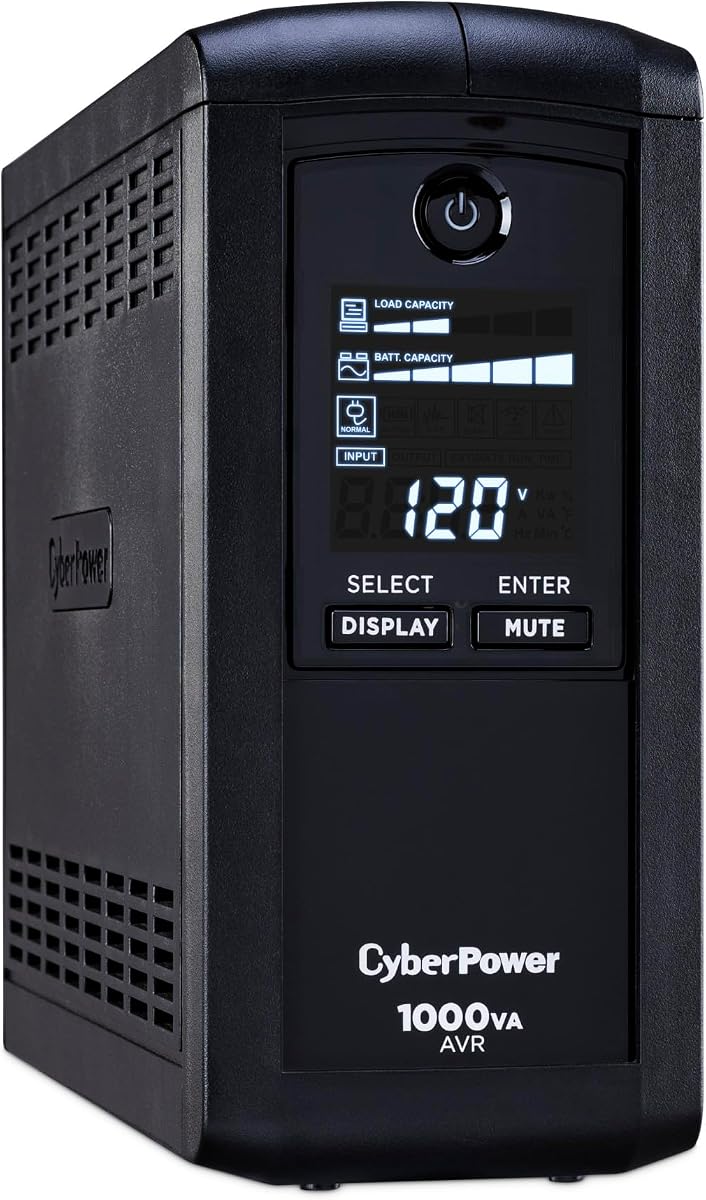
This model offers a dependable 1000VA capacity and automatic voltage regulation to protect your workstation from brownouts and minor fluctuations.
We may earn a commission when you buy through this link, at no additional cost to you.
The LCD display shows estimated runtime and battery health so you know exactly how much time you have to save work during a failure.
With five backup outlets it fits standard PC setups well and the strong guarantee provides confidence in its long term durability and safety.
Reliability seekers needing proven protection without extra frills will find this unit delivers solid performance and peace of mind daily.
Seeing estimated runtime helps you manage shutdowns safely and prevents surprise power loss when you are in the middle of critical tasks.
AVR corrects voltage drops instantly without using battery power which extends the overall life of the battery and saves money long term.
We may earn a commission when you buy through this link, at no additional cost to you.
This unit features a slim profile that fits neatly in tight spaces making it a practical choice for desks with limited room.
We may earn a commission when you buy through this link, at no additional cost to you.
Its high efficiency design reduces power consumption and the 900VA capacity provides enough backup for shutting down standard workstation hardware safely.
The six outlets offer enough flexibility for most desktop setups and the standby technology ensures fast switchover during unexpected power losses.
Users needing space saving protection without compromising on basic safety features will find this model offers a clean and efficient solution.
The slim shape allows placement under monitors or on crowded desks without taking up valuable workspace for keyboards or other tools.
High efficiency mode lowers idle power draw which helps reduce heat and electricity usage while keeping your backup ready when needed.
We may earn a commission when you buy through this link, at no additional cost to you.
This unit provides essential protection for smaller workstations or peripheral setups where budget constraints are a primary concern for buyers.
We may earn a commission when you buy through this link, at no additional cost to you.
Its 850VA rating delivers enough power to keep a single PC and monitor alive briefly while saving documents and shutting down gracefully.
The LCD ensures you stay informed about battery health and the connected equipment guarantee adds a layer of financial security against surges.
Entry level users needing basic surge and battery protection will find this model offers dependable performance without unnecessary features or cost.
Even basic workloads benefit from backup power to prevent data loss and hardware stress during sudden outages without complex setup needs.
Getting UPS protection at a lower price point makes it accessible for home offices or smaller devices that still need reliable power safety.
We may earn a commission when you buy through this link, at no additional cost to you.
Selecting a workstation battery backup involves balancing power capacity waveform type and extra features to match your specific hardware and workflow needs.
VA capacity measures the maximum load the UPS can support while wattage indicates the real power available so calculate your total device consumption first.
Choose a model that exceeds your total wattage needs to ensure adequate runtime and avoid overloading the battery during critical shutdown scenarios.
Pure sine wave units mimic utility power and are required for active PFC power supplies found in most modern workstations to avoid hardware stress or shutdowns.
Simulated sine wave units work with standard supplies but may cause issues with sensitive equipment so verify your PSU requirements before buying.
Traditional lead acid batteries need replacement every few years whereas lithium options offer longer lifespans and more charge cycles at a higher upfront cost.
Consider how often you plan to replace batteries and whether long term savings justify the initial investment in advanced chemistry.
Check how many outlets provide battery backup versus surge protection since not all sockets will run during an outage and your monitor may need backup power.
Ensure the spacing and number of outlets can accommodate your PC peripherals without requiring extra power strips that might complicate your setup.
AVR adjusts unstable incoming voltage without using battery power which protects your equipment during brownouts and extends the battery's useful life.
Prioritize models with AVR if your area experiences frequent power fluctuations to prevent unnecessary drain on your battery reserves.
LCD panels show real time battery health and load data helping you make informed decisions during outages without needing external software.
Color displays offer clearer alerts and status details but basic LCDs often suffice if you mainly need to check battery status periodically.
Look for warranties that cover the battery since it is the first component to fail and check the connected equipment guarantee limits for financial protection.
Longer warranty periods indicate manufacturer confidence and reduce risk of additional costs if the unit or battery fails prematurely.
Management software allows automatic safe shutdowns of your system when battery levels run low preventing data corruption or unsaved work.
Advanced units may offer remote management cards for network monitoring which is useful for multiple workstations or unattended servers.
Plug the UPS into a grounded wall outlet and then connect your workstation and peripherals to the battery backed up outlets marked clearly on the unit.
Install the provided software to enable automatic shutdown and monitoring features and run a self test to confirm the battery is functioning correctly.
Avoid overloading the UPS and check battery health periodically to ensure it provides adequate backup time when an outage occurs unexpectedly.
Pure sine wave provides clean smooth power like utility outlets which is required for active PFC power supplies. Simulated sine wave uses a stepped approximation that works for most standard supplies but may cause issues with sensitive electronics.
Add the wattage of all devices you plan to connect and choose a UPS with at least 25% more capacity than your total load to ensure safe operation during outages.
Most lead acid batteries need replacement every three to five years. Check the status indicator on the UPS LCD or software to know when the battery is no longer holding sufficient charge.
Some generators produce unstable power that may prevent the UPS from recognizing utility power causing it to drain battery unnecessarily. Verify generator compatibility before connecting.
The UPS immediately switches to battery power keeping your devices running so you can save work and shut down safely without losing data or experiencing surges.
No. Typically half the outlets provide battery backup while the others offer surge protection only. Check the unit labels to ensure your critical devices connect to backed up sockets.
Our top picks balance capacity waveform quality and long term value with the CP1500PFCLCD leading for pure sine wave reliability and the GOLDENMATE offering unmatched battery life.
Prioritize pure sine wave if you have active PFC supplies and ensure the VA rating exceeds your total load to avoid overloading the unit during critical shutdowns.
Always verify current prices and availability before purchasing as these numbers can change frequently and the best model for you depends on your specific hardware needs.