
MFi Certified USB 3.0 Flash Drive 128GB
4.3Editor score
MFi Certified
3-in-1 Connectors
One Click Backup
This guide compares the top flash drives for iPhone to help you find reliable external storage for photos videos and files without cloud fees.
Modern smartphones offer incredible performance but storage limits often hinder capturing life moments freely. External flash drives for iPhone solve this by providing portable, secure, and expandable memory options for users who need more space without subscribing to cloud services.
We evaluated ten leading models based on compatibility, speed, build quality, and ease of use. Our selection includes certified options for Lightning and USB-C devices ensuring seamless integration with iOS systems and cross-platform support for Android and PC users.
Each pick highlights specific strengths like encryption, app support, or dual connectors to match diverse needs. Prices fluctuate often so check current listings before buying. This guide helps you choose the right drive for your workflow and budget today.
4.3Editor score

4.4Editor score

4.6Editor score
Below you will find a side-by-side comparison of all ten products ranked by performance and value. This table summarizes key specs like capacity, connector types, and unique features to help you decide quickly.


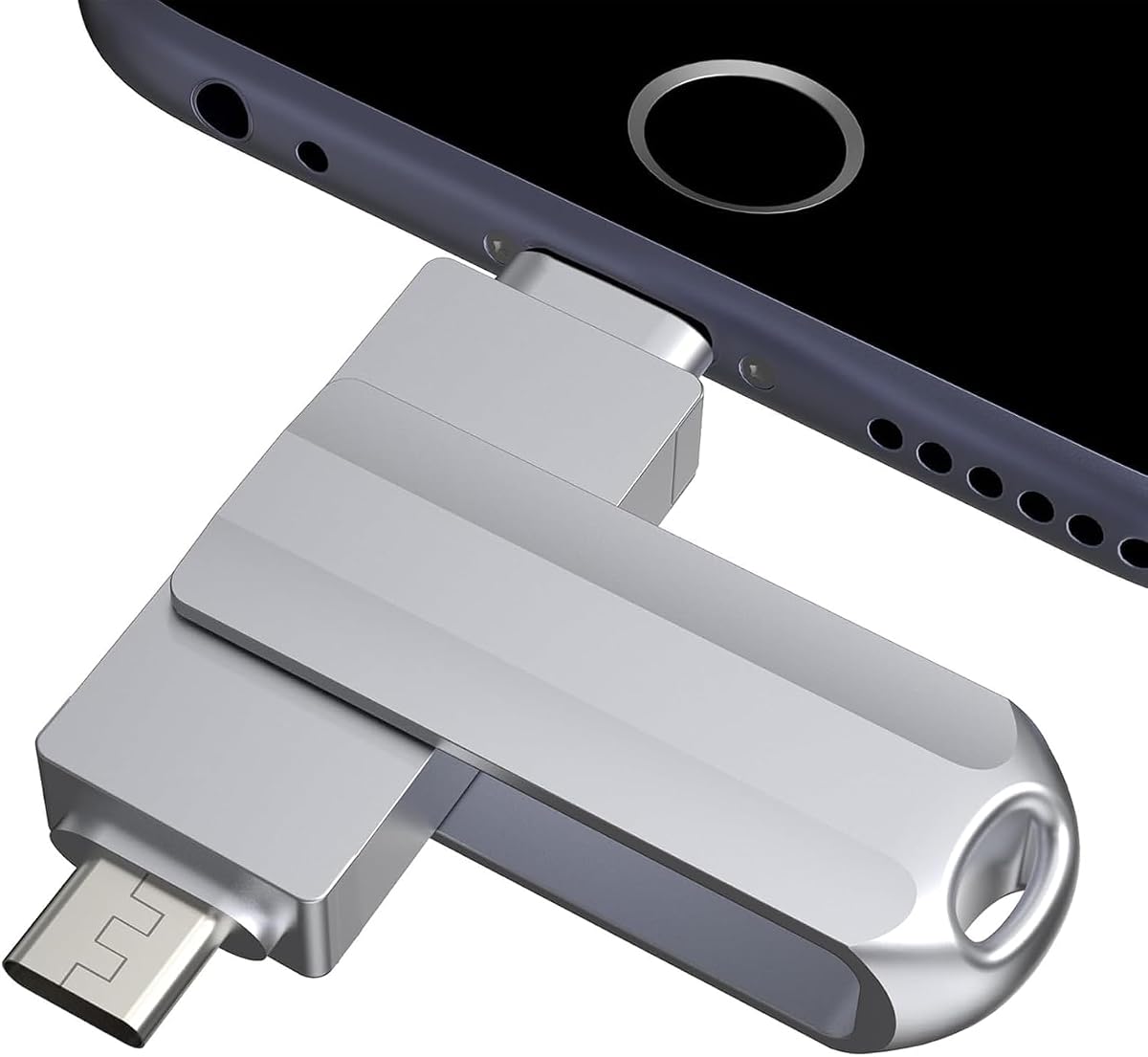


This MFi certified drive stands out as a top choice for iPhone users needing reliable external storage. With 256GB capacity and dual Lightning and USB-C support it handles everything from photos to large videos efficiently.
We may earn a commission when you buy through this link, at no additional cost to you.
Its advanced chip technology ensures secure data protection while the one-click backup feature simplifies freeing up space without cables. The included keychain prevents loss and the metal body withstands daily wear and tear.
While you must download the app on iOS devices the process is straightforward and the encryption features add peace of mind. Speeds are solid though not the fastest on the market.
Perfect for travelers and professionals who need to store and share files on the go. We recommend this for its balance of speed security and broad device support.
Protect sensitive files with Touch ID or passcode encryption options available through the app.
Stream stored movies or music directly from the drive while traveling without using phone storage.
We may earn a commission when you buy through this link, at no additional cost to you.
Ideal for users on a tight budget this drive offers essential MFi certification and versatile connectivity at a low cost. Its 128GB capacity is enough for daily backups and media storage.
We may earn a commission when you buy through this link, at no additional cost to you.
The one-click backup feature makes transferring photos quick and the metal casing protects against environmental damage. You can share files directly to social media which is convenient for social users.
Speeds are decent for the price point and the design prevents accidental drops. However you will need to install an app on your iPhone to access full functionality.
We suggest this for students or casual users who need affordable expandable storage without premium features.
Send photos or videos from the drive to platforms like Facebook instantly after backup.
Weighing little and attached to a keychain it fits easily in any bag or pocket.
We may earn a commission when you buy through this link, at no additional cost to you.
SanDisk is a well-known name in storage and this drive maintains that reputation with robust performance for iPhone 15 and older models. It supports both USB-C and Lightning connections seamlessly.
We may earn a commission when you buy through this link, at no additional cost to you.
The Memory Zone app allows partial backups if storage is limited and tracks progress in real time. This makes managing files easier without needing to clear space manually.
While more expensive than generic brands the build quality and app reliability justify the cost for many. Security features let you password protect important documents and photos.
This is the go-to choice for users who value brand trust and integrated software tools over raw speed.
Back up files even when storage is limited with the app's smart partial backup mode.
Monitor transfer progress visually to avoid interruptions during large file moves.
We may earn a commission when you buy through this link, at no additional cost to you.
This solid state drive delivers speeds that rival internal storage with read rates up to 400MB/s. It eliminates cables and uses direct USB-A and USB-C connections for instant transfers.
We may earn a commission when you buy through this link, at no additional cost to you.
The Lexar app provides easy photo backup and management though it lacks iCloud support. The metal housing is robust enough to survive drops and extreme temperature ranges.
Although pricey the performance is unmatched for moving large video files or datasets quickly. It is best for Mac or Android users with USB-C ports.
Choose this if speed and durability are your top priorities and you do not need Lightning connectivity.
Transfer files four times faster than standard USB 3.0 drives with SSD technology.
The metal enclosure protects connectors and internal components from physical damage.
We may earn a commission when you buy through this link, at no additional cost to you.
With four interfaces including Micro USB this drive covers more devices than most options. The retractable mechanism protects connectors and keeps everything in one compact unit.
We may earn a commission when you buy through this link, at no additional cost to you.
It supports iOS 12.1+ and OTG Android phones easily. You can back up files with one click and encrypt personal files for privacy.
Write speeds are moderate but adequate for photos and music. The blue color and keychain make it easy to identify and carry.
This is a strong pick for users with diverse device types needing flexible connectivity and decent capacity.
Hide connectors when not in use to prevent dust and physical damage.
Store 4K videos and large photos without running out of space on the drive.
We may earn a commission when you buy through this link, at no additional cost to you.
Weighing only 26g this drive is incredibly portable and fits anywhere. The swivel design ensures you never lose caps and switching ports is effortless.
We may earn a commission when you buy through this link, at no additional cost to you.
It works without extra software on most systems and the 3-year warranty adds long-term value. Performance is standard for USB 3.2 with reliable file transfers.
The metal enclosure offers protection against drops and heat. It suits users who need simple plug-and-play functionality.
We recommend this for everyday backups and casual use across laptops and phones.
Rotate the 360-degree swivel to switch ports without caps or extra parts.
No driver or software installation required for immediate file access on PC and Mac.
We may earn a commission when you buy through this link, at no additional cost to you.
With 512GB capacity this drive holds thousands of photos and hours of video. The included USB adapter lets you access files on laptops without extra cables.
We may earn a commission when you buy through this link, at no additional cost to you.
The mFlash app helps organize backups and supports daily or travel use. It is ideal for creators who need huge storage in one place.
Speeds are sufficient for media storage and the design is simple. The large capacity reduces the need for multiple drives.
Perfect for videographers and photographers who need to archive content securely.
Store up to 512GB of files including 4K videos and RAW images.
Connect to computers via USB-A with the included adapter without extra accessories.
We may earn a commission when you buy through this link, at no additional cost to you.
This drive offers solid MFi certification with waterproof and dustproof features. It handles high temperatures and keeps files safe in various conditions.
We may earn a commission when you buy through this link, at no additional cost to you.
You can back up with one click and encrypt files separately for privacy. The metallic silver look is sleek and the keychain prevents loss.
Performance is reliable for photos and documents though not the fastest available. It supports iOS and Android easily.
A good balanced choice for daily backups and outdoor use.
Resist water and dust damage for durability in tough environments.
Encrypt specific files to maintain privacy on shared devices.
We may earn a commission when you buy through this link, at no additional cost to you.
This drive delivers speeds up to 550MB/s making it one of the fastest available. It connects via USB-C and USB-A for universal use across laptops and phones.
We may earn a commission when you buy through this link, at no additional cost to you.
The zinc alloy shell is tough and helps dissipate heat during large transfers. It requires no software and works with Windows and Android.
Performance is excellent for large files but it does not support Lightning ports. The price reflects the high-speed capabilities.
Best for power users who prioritize speed and durability.
Transfer files ten times faster than traditional USB 3.0 memory sticks.
Durable exterior protects against falls and offers rapid heat dissipation.
We may earn a commission when you buy through this link, at no additional cost to you.
This drive works directly with the iOS Files app without downloading extra software. It supports USB-C and Micro USB interfaces alongside USB for broad compatibility.
We may earn a commission when you buy through this link, at no additional cost to you.
You can simply plug it in and manage files through your phone. It is simple and straightforward for non-tech users.
Write speeds are slower but read speeds are decent for photo access. The design helps users identify it easily.
Ideal for users who want plug-and-play simplicity without app hassles.
Manage files directly in the iOS Files app without installing third-party apps.
Connect to USB, USB-C, and Micro USB devices with the included adapters.
We may earn a commission when you buy through this link, at no additional cost to you.
Choosing the right flash drive involves understanding compatibility, capacity, and software features to meet your storage needs effectively.
Ensure the drive has the right ports for your device. Look for USB-C for newer iPhones and Lightning for older models. Some drives offer adapters for laptops and Android.
Check MFi certification for guaranteed iOS compatibility and secure data transfer.
Assess how much space you need for photos, videos, and documents. 128GB suits casual users while 512GB is ideal for media creators.
Higher capacity drives cost more but reduce the need for frequent deletions or multiple drives.
Look for high read/write speeds to save time during backups. USB 3.2 and SSD drives offer faster transfers than standard options.
Speeds vary by device and file type so check benchmarks for realistic performance estimates.
Some drives need proprietary apps for full functionality which may affect ease of use. Others support native iOS Files apps for simpler management.
Decide if you prefer app-based encryption or simple plug-and-play access.
Metal housings offer better protection against drops and heat. Waterproof and dustproof features help if you use the drive outdoors.
Consider weight and size for portability especially if you carry it daily.
Encryption options like password protection or biometric security keep private data safe. Some drives allow file-specific encryption for added control.
Choose drives with robust security if you handle sensitive business or personal files.
Brands often offer 1 to 3-year warranties to protect your investment. Reliable customer service helps resolve compatibility issues quickly.
Check return policies to ensure satisfaction with performance and fit.
Connect the drive directly to your iPhone or iPad using the appropriate port. If required download the app from the App Store and grant access permissions to start backing up files.
For Android phones enable OTG in settings if needed and use the file manager to access data. On PCs simply plug into USB ports and transfer files via Explorer or Finder.
Store the drive in a dry place and avoid extreme temperatures to maintain longevity. Always eject safely through the app or Files menu to prevent data corruption.
Some drives require a proprietary app for full features like backup and encryption. Others work directly with the iOS Files app without extra software. Check product details for requirements.
Yes, MFi certification ensures the drive meets Apple's standards for performance and safety. Non-certified drives may cause errors or fail to connect properly on iOS devices.
Most drives with USB-C or OTG support work with Android devices. Enable USB OTG in settings if needed and use a file manager to access content.
Backup photos and videos to the drive using the app or Files app. Then delete them from your phone storage to reclaim space instantly.
Some models feature waterproof and dustproof designs for durability. Others are not water-resistant so avoid exposing them to liquids.
Yes, many drives allow on-the-go playback of stored movies and music. Use the drive's app or supported media player to stream content.
Our top picks offer a range of options from budget-friendly to high-speed SSD models. Each delivers reliable storage to expand your phone without relying on cloud subscriptions.
Prioritize compatibility and encryption based on your privacy and device needs. Choose models with durable builds to ensure long-term usability.
Prices change frequently so check current deals before purchasing. This guide helps you make an informed decision tailored to your lifestyle.