
Anker Laptop Docking Station Dual Monitor
4.5Editor score
8-in-1 USB C Hub
Dual 4K HDMI Output
85W Power Delivery Support
This guide compares the top docking stations with 2 HDMI ports for multitasking, covering connectivity, display support, power delivery, and compatibility for
Finding the right docking station with 2 HDMI ports can transform your laptop into a powerful desktop workstation. These devices allow you to connect multiple monitors, peripherals, and charging cables through a single connection point. Whether you work from home or travel frequently, the right hub enhances productivity and reduces clutter.
We evaluated ten top-rated docking stations based on their port selection, video output capabilities, power delivery, and overall build quality. Our analysis focuses on models that support dual HDMI connections reliably across different operating systems. Each product was reviewed for its ability to handle modern workflows without compromising performance or stability.
Every pick in this list highlights specific strengths such as budget friendliness, premium features, or versatile connectivity options. You will find detailed breakdowns of what each model offers and who it suits best. Keep in mind that prices and availability may change, so verify current details before purchasing.
4.5Editor score

4.5Editor score

4.4Editor score
This comparison table provides a side-by-side look at all ten products featured in this guide. It highlights key specifications such as port count, video output resolution, power delivery wattage, and compatibility notes to help you make an informed decision quickly.


The Anker 8-in-1 USB-C Hub stands out as a premium docking solution for users needing dual HDMI ports. With a rating of 4.5 stars, it delivers stable performance and versatile connectivity through a single USB-C connection.
We may earn a commission when you buy through this link, at no additional cost to you.
This hub supports dual 4K displays at 30Hz or a single 4K at 60Hz, making it ideal for multitasking workflows. It includes two USB-A ports, an Ethernet port, and a card reader. Power Delivery support allows pass-through charging up to 85W keeping your laptop powered during use.
While it does not support extended desktop mode on macOS due to system limitations, Windows users can extend displays seamlessly. The lack of a built-in power cable means you need a separate USB-C charger but the device is designed for reliability and ease of use.
This docking station is perfect for professionals who value quality and compactness. Its Anker Advantage reputation ensures friendly customer service and a solid warranty. For those seeking a trusted dual HDMI hub, this model is a top recommendation.
Dual HDMI ports support 4K resolution enabling clear visuals for presentations or media consumption without lag.
Ethernet and SD card readers ensure you stay connected to wired networks and access storage without extra adapters.
We may earn a commission when you buy through this link, at no additional cost to you.
The Acer 13-in-1 Docking Station earns Editor's Choice status for its robust feature set and triple display support. It allows users to connect up to three independent screens on compatible Windows laptops enhancing productivity significantly.
We may earn a commission when you buy through this link, at no additional cost to you.
This dock includes two HDMI ports and one DisplayPort enabling versatile monitor configurations. The 110W power adapter provides sufficient power for heavy workloads and simultaneous device charging. An integrated security lock slot adds physical protection for shared office spaces.
While triple 4K output depends on host laptop compatibility and Display Stream Compression support, 1080p triple displays work reliably. The aluminum body dissipates heat effectively and the Ethernet port ensures stable internet connections without Wi-Fi interference.
Ideal for power users needing maximum screen real estate, this dock balances performance and price. The included power adapter and strong support team make it a reliable investment. For complex workstations, this model delivers exceptional value and capability.
Supports up to three screens allowing you to manage multiple apps or data sources simultaneously.
The lock slot secures your dock to your desk protecting valuable equipment from theft in public or shared areas.
We may earn a commission when you buy through this link, at no additional cost to you.
The Selore 8-in-1 Dual HDMI Dock offers an excellent balance of features and affordability. It allows users to expand their workspace with two high-resolution monitors while maintaining a budget-friendly price tag.
We may earn a commission when you buy through this link, at no additional cost to you.
This hub supports dual 4K at 60Hz ensuring smooth video playback and crisp text. A 100W PD charging port keeps your laptop powered during use and USB-A ports support peripherals. The aluminum design helps dissipate heat and feels durable.
Users must supply their own USB-C power adapter for charging but the hub supports up to 100W input. macOS users are limited to mirroring due to system constraints while Windows laptops can extend displays. Setup is straightforward with no drivers required.
This model is perfect for budget-conscious professionals or students needing dual screens. Its versatility and price make it a standout choice. For those seeking essential dual HDMI connectivity without overspending, Selore delivers great value.
Affordable pricing makes dual monitor setups accessible without breaking your budget or compromising on quality.
Supports 100W Power Delivery so you can charge your laptop while using all connected accessories.
We may earn a commission when you buy through this link, at no additional cost to you.
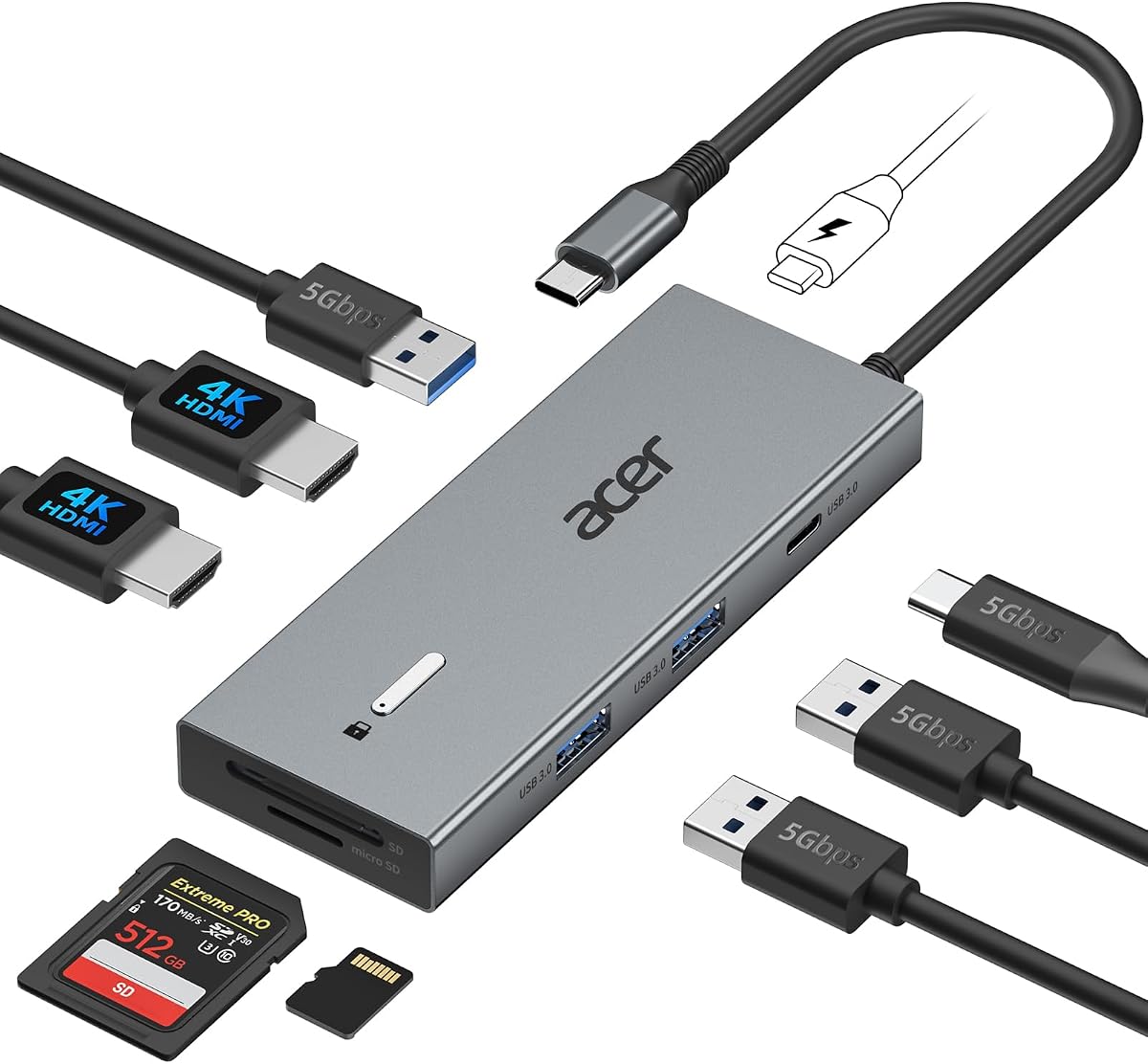
The Acer 9-in-1 Dock provides a practical solution for dual monitor setups with added security features. It supports dual 4K displays at 60Hz and includes a built-in cable for convenience. The 90W PD output keeps most laptops charged during work.
We may earn a commission when you buy through this link, at no additional cost to you.
This model features a security lock button allowing quick access to device protection. The aluminum body ensures heat dissipation and durability. Users appreciate the compact design which saves desk space while offering multiple USB and SD card ports.
A limitation is the lack of an included power adapter requiring users to bring their own. macOS support is limited to mirroring but Windows laptops work well. The built-in cable reduces clutter and simplifies setup at desks.
Ideal for office environments needing quick security and clean cable management, this dock is a strong choice. Its price and features make it competitive among mid-range options. For those valuing convenience and reliability, it is worth considering.
A pre-attached cable reduces cable clutter and ensures secure connection to your laptop without extra accessories.
The lock button allows rapid screen locking protecting sensitive data during brief absences from your desk.
We may earn a commission when you buy through this link, at no additional cost to you.
The Dell D3100 is a robust docking station designed for users with USB 3.0 ports needing triple display support. It includes HDMI and DisplayPort outputs allowing flexible monitor connections. The 65W adapter is sufficient for many business laptops.
We may earn a commission when you buy through this link, at no additional cost to you.
This dock supports up to three external displays on compatible Windows systems. It includes an HDMI to DVI cable for legacy monitor compatibility. The build quality is sturdy ensuring long-term reliability. USB 3.0 ports provide fast data transfer for peripherals.
While it uses older USB 3.0 technology rather than USB-C, it works well with older Dell models. The footprint is larger but provides ample ports. Setup may require driver installation for certain functions but it remains a trusted legacy option.
Best for users with older hardware or needing triple displays without USB-C, this dock offers practical value. The included DVI adapter adds versatility. For those maintaining older workstations, it is a reliable upgrade path.
Works with older laptops using USB 3.0 ensuring continued usability without needing a new computer.
Allows up to three external screens for complex workflows requiring extensive visual workspace.
We may earn a commission when you buy through this link, at no additional cost to you.
The Anker 7-in-1 Hub focuses on speed and portability with a compact design. It supports dual 1080p monitors for clear visuals and includes a high-speed 10Gbps USB port for rapid file transfers. Power Delivery up to 100W ensures laptops stay charged.
We may earn a commission when you buy through this link, at no additional cost to you.
This hub is ideal for users prioritizing data speed over high-resolution video. The compact size makes it travel-friendly. USB-C and USB-A ports support various peripherals. Anker's reputation ensures reliable customer service and product quality.
Limitations include lack of Ethernet and 4K HDMI outputs which may not suit all users. macOS mirrors displays while Windows extends them. Setup is plug-and-play with no drivers required for most functions.
Perfect for travelers needing speed and dual screens without bulk, this hub delivers solid performance. Its price reflects its focused feature set. For those needing fast data and portability, it is a strong contender.
The 10Gbps port moves large files quickly reducing wait times and improving workflow efficiency.
Compact form factor ensures easy travel and fits neatly on small desks or in laptop bags.
We may earn a commission when you buy through this link, at no additional cost to you.
The MOKiN 13-IN-1 Dock offers extensive connectivity including dual 4K HDMI and Ethernet ports. It supports 100W Power Delivery to keep laptops charged during heavy use. A privacy lock button allows quick screen protection in shared spaces.
We may earn a commission when you buy through this link, at no additional cost to you.
This hub includes multiple USB-A and USB-C ports supporting various peripherals. The Ethernet port ensures stable internet connections without Wi-Fi interference. Aluminum construction helps dissipate heat during extended sessions. Plug-and-play setup works on most systems.
Users must supply their own 100W adapter for charging. macOS limits to mirroring while Windows allows extensions. The privacy button is a unique feature enhancing security. It balances high-end features with an accessible price point.
Ideal for users needing Ethernet and multiple USB ports alongside dual HDMI, this dock is versatile. The privacy button adds practical security. For diverse connectivity needs without premium pricing, it is a smart choice.
RJ45 port provides reliable wired internet reducing lag during video calls or large downloads.
The lock button lets you secure sensitive screens instantly in public or office environments.
We may earn a commission when you buy through this link, at no additional cost to you.
The Selore 10-in-1 Dock supports up to three independent 4K monitors on Windows. It includes HDMI, DP, and VGA ports for broad compatibility. A dedicated monitor control button allows quick switching between display modes or power saving.
We may earn a commission when you buy through this link, at no additional cost to you.
This hub offers an 8K display port for future-proofing and includes Ethernet and SD card readers. Power Delivery up to 85W keeps laptops charged. The aluminum chassis ensures durability and heat dissipation. Setup is plug-and-play without drivers.
Limitations include macOS mirroring only and needing a separate power adapter. Windows users benefit from extended mode across three screens. The monitor button adds convenience for multi-monitor users. It balances high-end video support with practical features.
Perfect for traders or designers needing multiple screens at high resolution, this dock delivers. The monitor button enhances workflow efficiency. For high-resolution dual or triple setups, it stands out as a capable option.
Supports three 4K monitors simultaneously enabling expansive workspace for complex data tasks.
Quick access to screen modes saves time and energy during daily work cycles.
We may earn a commission when you buy through this link, at no additional cost to you.
The Anker 13-in-1 Dock supports triple displays at 1080p@60Hz or single 4K at 60Hz. It includes a 135W adapter ensuring full power delivery for laptops and phones simultaneously. Multiple USB-C and USB-A ports support diverse peripherals.
We may earn a commission when you buy through this link, at no additional cost to you.
This hub features a vertical design saving desk space. The SD card reader enables fast file access. Ethernet and audio ports add connectivity. It is built for Windows with extended mode supported while macOS mirrors screens.
While powerful, 4K triple displays are not supported. The adapter is included which is a plus. Setup is straightforward for most users. Compact design reduces clutter while offering extensive ports for workstation needs.
Ideal for users needing high power and triple screens without buying adapters separately, this dock is strong. The vertical design is space-efficient. For those needing comprehensive connectivity, it offers reliable utility.
135W adapter ensures full power delivery for multiple devices without needing extra purchases.
Compact vertical layout fits neatly on desks freeing up valuable workspace.
We may earn a commission when you buy through this link, at no additional cost to you.
The Acer 13-in-1 Docking Station offers premium expansion with triple display support and a 110W power adapter. It features two HDMI ports and one DisplayPort for versatile setups. The Gigabit Ethernet ensures reliable internet connectivity.
We may earn a commission when you buy through this link, at no additional cost to you.
This hub includes a security lock slot protecting devices in public spaces. The aluminum body dissipates heat efficiently. It supports high-speed data transfer via USB-A and USB-C. Setup is plug-and-play on most systems.
Limitations include macOS mirroring only and requiring DSC for triple 4K. Windows users benefit from extended mode across screens. The power adapter is included ensuring sufficient wattage for heavy workloads. It balances robust features with solid build quality.
Perfect for professionals needing multiple screens and reliable connectivity, this dock delivers. The security and power features add significant value. For demanding workflows requiring stability, it is a reliable choice.
Supports three independent screens for multitasking across complex projects efficiently.
Lock slot secures hardware to desks protecting against theft in shared environments.
We may earn a commission when you buy through this link, at no additional cost to you.
Selecting the right docking station requires understanding your specific needs regarding display resolution, power requirements, and connectivity options. This guide breaks down essential factors to help you choose a model that supports your workflow without unnecessary cost or complexity.
Most docking stations with 2 HDMI ports support 4K resolution but refresh rates vary between 30Hz and 60Hz. Higher refresh rates ensure smoother visuals for video editing or gaming while standard 30Hz works for static work. Check if your laptop supports DP Alt Mode to achieve these resolutions without lag or flickering.
Choose a dock that matches your monitor's maximum capability to avoid bottlenecks.
Power Delivery (PD) wattage is critical for charging your laptop while using peripherals. Laptops needing 65W or more require docks supporting 85W to 100W pass-through. Always confirm whether the power adapter is included or sold separately to avoid extra costs.
Ensure the dock's PD output meets or exceeds your laptop's original charger rating.
Beyond HDMI ports, consider USB-A and USB-C availability for peripherals like mice, keyboards, or storage. Gigabit Ethernet ports provide stable internet for video conferencing. SD card readers help photographers access files quickly without extra dongles.
A balanced port mix reduces the need for additional adapters and simplifies cable management.
Windows laptops generally support extended desktops via MST while macOS often restricts to mirroring. Verify system requirements before purchasing to avoid display limitations. Some docks require specific drivers or settings to enable multi-monitor setups on older OS versions.
Confirm OS compatibility ensures your intended display mode works without software issues.
Aluminum bodies dissipate heat better than plastic and add durability for travel or daily use. Compact designs save desk space while vertical models stack neatly. Built-in cables reduce clutter but limit replacement options if they get damaged over time.
Choose a design that fits your workspace and travel habits for long-term convenience.
Reputable brands offer 18-month warranties and responsive customer service. Check support channels for troubleshooting or replacement policies. Longer warranties indicate confidence in product reliability and protect your investment against defects.
Prioritize brands with proven support records to minimize downtime if issues arise.
Prices vary from budget-friendly hubs under $30 to premium docks over $100. Higher costs often include power adapters and advanced features like triple displays. Assess whether extra ports justify the price or if a simpler model meets your needs.
Balance cost against essential features to avoid overspending on unnecessary capabilities.
Look for docks supporting Thunderbolt 3/4 or USB4 for higher bandwidth and compatibility with future devices. High-resolution video support like 8K on DisplayPort ensures longevity as monitors upgrade. Invest in models that grow with your tech needs.
Future-proofing reduces replacement frequency and protects your investment long-term.
Connect the docking station to your laptop using the provided or compatible USB-C cable. Ensure the port on your laptop supports video output and Power Delivery for best results. Plug monitors into the HDMI ports and adjust display settings in your OS to extend or mirror screens.
Secure your docking station using any included lock slot or place it on a stable surface to prevent disconnections. For portable setups, store the dock and cables in a protective case to avoid physical damage. Regularly check cable connections for tightness and inspect ports for debris.
Update your laptop's graphics drivers regularly to ensure compatibility with the docking station. If display issues arise, restart the dock by unplugging and replugging cables to reset the connection. Clean aluminum surfaces with a dry cloth to maintain appearance and prevent dust buildup.
Yes, but macOS typically limits external monitors to mirroring mode instead of extended desktop due to system restrictions. You can still use both HDMI ports to display the same content on two monitors. Check specific product notes for compatibility updates or workarounds.
Some docking stations include a power adapter while others require you to supply your own USB-C charger. Always check the product details to confirm if the adapter is included. A 65W or higher adapter ensures your laptop charges during use.
Most modern docks support dual 4K but refresh rates vary between 30Hz and 60Hz. Ensure your laptop supports DP Alt Mode and the dock has sufficient bandwidth. Using shorter HDMI cables helps maintain signal quality for higher resolutions.
Flickering often results from insufficient power delivery, poor cable quality, or outdated drivers. Try using a certified HDMI cable and ensure your USB-C connection is secure. Updating graphics drivers can resolve display stability issues.
Yes, some models support triple displays using an additional DisplayPort or VGA connection. Windows laptops often enable this via MST while macOS may limit to mirroring. Check product specs for maximum monitor support and OS requirements.
Connect the dock and monitors then open Display Settings in Windows. Choose Extend these displays to use separate workspaces. Ensure your laptop supports extended mode via USB-C or Thunderbolt for the dock to function properly.
We have reviewed ten docking stations offering dual HDMI ports suitable for various needs and budgets. The Anker 8-in-1 stands out as a premium choice while the Acer 13-in-1 offers triple display support. Budget-conscious buyers can rely on the Selore 8-in-1 for essential connectivity.
Prioritize power delivery and display resolution to match your laptop and monitor capabilities. Consider port selection and operating system compatibility to ensure smooth integration into your workflow. A well-chosen dock enhances productivity without requiring expensive hardware upgrades.
Prices and availability may fluctuate so verify current deals before making a purchase. Check manufacturer support and warranty terms for long-term reliability. With the right docking station, you can transform any laptop into a versatile desktop workstation.