
Microsoft Surface Dock
4.5Editor score
4 USB 3.0 ports
Magnetic Surface Connect cable
Gigabit Ethernet port
Discover the best docking stations for Surface Pro in October 2026. This guide compares top models for connectivity, charging, and multi-monitor support.
Transform your Microsoft Surface Pro into a powerful desktop workstation with the right docking station. These devices provide essential ports for monitors, keyboards, and storage while keeping your desk organized and efficient.
We compared ten top-rated docking stations based on compatibility, port variety, charging speed, and display support. Our analysis focuses on models that deliver reliable performance for professionals, students, and creative users.
Each pick highlights specific strengths like triple-screen setups, fast data transfer, or premium build quality. Note that product availability and pricing may change over time, so verify details before purchasing.
4.5Editor score

4.4Editor score

4.5Editor score
The following table compares key specifications across all ten featured docking stations. Review port counts, video output capabilities, and power delivery to find the model that fits your specific Surface device.




This official Microsoft Thunderbolt 4 docking station earns our Editor's Choice for its superior speed and seamless Surface integration. It offers lightning-fast data transfer and supports dual 4K monitors for a true desktop experience.
We may earn a commission when you buy through this link, at no additional cost to you.
The Thunderbolt 4 ports deliver exceptional bandwidth for connecting high-speed drives and external displays. Quick charge capability powers your Surface in just 2.5 hours, minimizing downtime during busy workdays.
While the price is higher than third-party alternatives, the premium build and reliable performance justify the cost. The eco-friendly design using recycled ocean-bound plastic also appeals to environmentally conscious buyers.
Professional users needing maximum performance and official compatibility should prioritize this model. It remains the top recommendation for those seeking a hassle-free, high-speed Surface Pro docking solution.
Thunderbolt 4 provides unmatched bandwidth for transferring large files and connecting multiple 4K displays simultaneously without lag or bottlenecks.
Designed specifically for the Surface ecosystem, this dock ensures stable connections and optimal power delivery that third-party hubs often cannot match.
We may earn a commission when you buy through this link, at no additional cost to you.
This classic Microsoft Surface Dock offers excellent value as our Best Budget pick. It transforms your Surface into a desktop PC using a magnetic Surface Connect cable for quick attachment and detachment.
We may earn a commission when you buy through this link, at no additional cost to you.
With four USB 3.0 ports and two Mini DisplayPorts, you can connect essential peripherals like keyboards, mice, and external monitors. The gigabit Ethernet port ensures stable wired internet for remote work tasks.
The main limitation is fewer video output options compared to newer models. However, for users who only need dual displays and standard USB connectivity, this dock provides reliable performance.
Budget-conscious buyers or those with older Surface models will appreciate its simplicity and cost. It remains a solid entry-level solution for basic office setups without complex display needs.
The magnetic cable makes setup effortless, allowing you to attach or remove your Surface in seconds for a clean and organized workspace.
Despite its modest size, this dock includes enough USB and video ports to handle everyday productivity tasks without needing extra adapters.
We may earn a commission when you buy through this link, at no additional cost to you.
The NEW Microsoft Surface Dock 2 is our Best Premium choice, offering next-generation connectivity for advanced Surface users. It supports dual 4K monitors at 60Hz for smooth visuals and productivity.
We may earn a commission when you buy through this link, at no additional cost to you.
With a powerful 199W power supply, this dock can charge your Surface and multiple peripherals simultaneously without performance drops. Front-facing USB-C ports make accessing devices convenient on your desk.
The longer 80 cm Surface Connect cable provides flexibility in positioning your dock away from your device. Security lock support adds peace of mind in shared or public workspaces.
Investors in premium hardware or power users requiring 60Hz refresh rates should choose this model. It delivers a top-tier docking experience unmatched by budget alternatives.
Dual 4K at 60Hz ensures crisp, flicker-free visuals perfect for video editing, design work, or multitasking across multiple high-resolution screens.
The 199W power supply ensures your Surface remains fully charged even under heavy load, eliminating the need for a separate charger.
We may earn a commission when you buy through this link, at no additional cost to you.
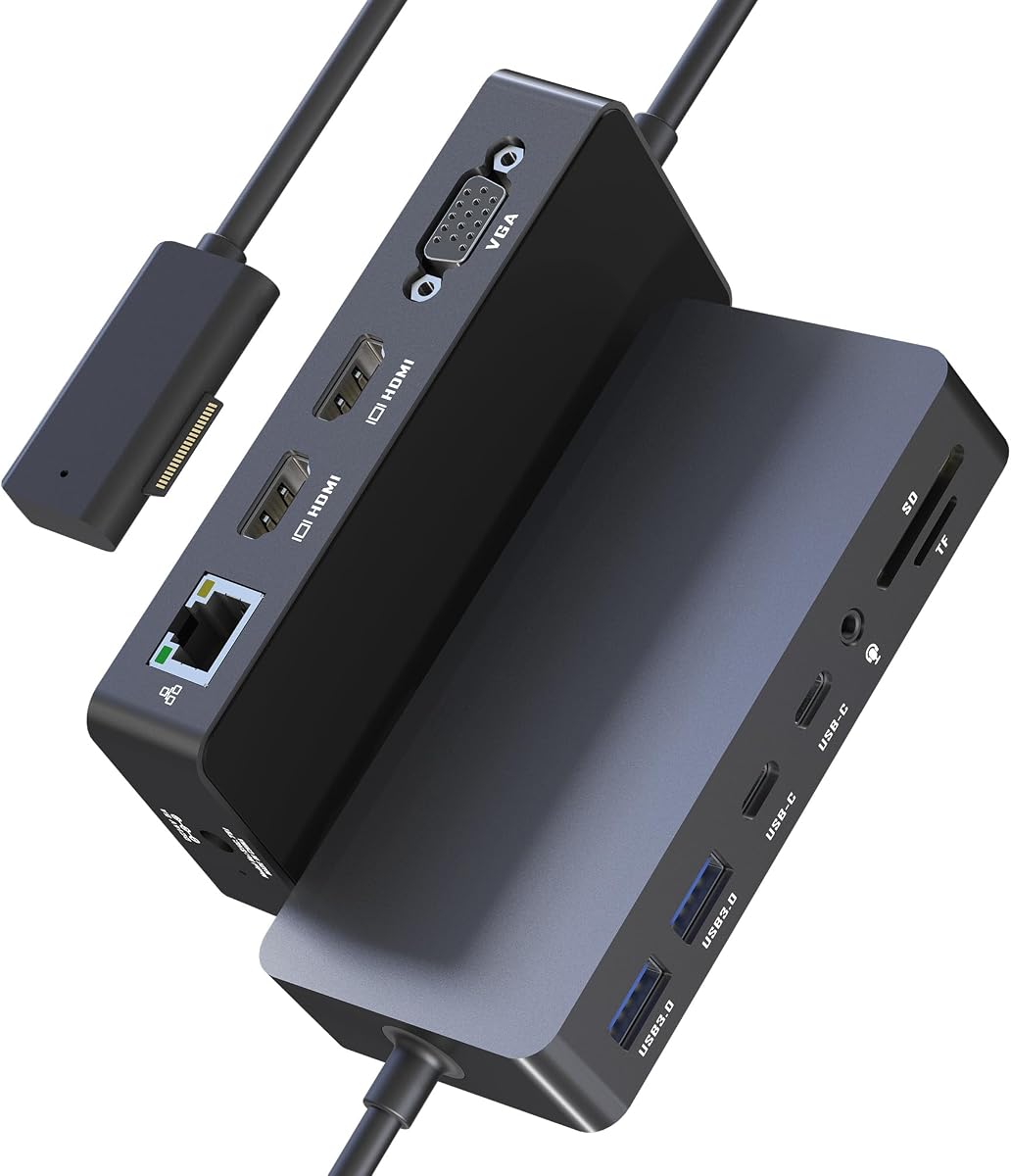
This 12-in-1 docking station excels at enabling triple monitor setups via dual HDMI and VGA ports. It boosts productivity by allowing extensive multitasking across multiple screens.
We may earn a commission when you buy through this link, at no additional cost to you.
Compatibility spans many Surface Pro generations along with Laptop and Go models. The SD/TF card slots make it ideal for photographers or users needing quick media access.
The Ethernet port is limited to 100Mbps which may bottleneck high-speed internet connections. VGA is also an older standard but useful for legacy monitors.
Creative professionals or students needing three screens on a budget will find this practical. Just note the display requirement to turn off the Surface screen when using three external monitors.
Supporting three external displays simultaneously lets you keep reference material, tools, and main work visible at all times without constant switching.
Built-in SD and TF card slots allow direct camera memory card access for fast photo transfers without needing extra readers.
We may earn a commission when you buy through this link, at no additional cost to you.
With a high 4.8 rating this model is engineered for creative professionals needing fast data and stable connections. It offers dual HDMI and VGA for triple display capabilities.
We may earn a commission when you buy through this link, at no additional cost to you.
A 72W power supply handles charging while running multiple peripherals. Two USB-C and two USB-A ports allow high-speed file transfers from external drives.
Setup requires turning off the Surface screen when using three external displays which adds a step. The network port provides stable connections for video calls or large file uploads.
Creators moving between home and office will appreciate its reliable performance. The combination of fast charging and multi-screen support makes it a strong choice for demanding workflows.
USB 3.0 and USB-C ports deliver 5Gbps speeds enabling rapid offloading of photos videos or project files from external drives.
The 72W power adapter ensures your device stays powered while connected to multiple high-demand peripherals during long work sessions.
We may earn a commission when you buy through this link, at no additional cost to you.
This compact docking station supports dual 4K HDMI outputs for clear visuals alongside a VGA port for triple screens. Its small footprint keeps desks tidy without sacrificing functionality.
We may earn a commission when you buy through this link, at no additional cost to you.
The included 72W power adapter ensures your Surface charges while connected. High-speed data transfer via USB 3.0 and USB-C allows quick file syncing.
HDMI supports up to 30Hz which may feel slightly less smooth than 60Hz for video. Build materials are functional but not premium compared to official Microsoft docks.
Users with limited desk space needing multiple high-res displays will benefit from this model. It balances performance and size well for hybrid home-office environments.
A small footprint allows this dock to fit on smaller desks or travel bags making it ideal for remote workers on the go.
Dual 4K HDMI ports deliver crisp image quality suitable for document work, media consumption, or presentation setups.
We may earn a commission when you buy through this link, at no additional cost to you.
This renewed Surface Dock 2 offers premium features at a more accessible price. It maintains all key specs including dual 4K at 60Hz and 199W power delivery.
We may earn a commission when you buy through this link, at no additional cost to you.
Front and rear USB-C ports ensure versatile connectivity for modern peripherals. The longer 80 cm cable provides flexibility in desk arrangements.
Renewed products may show minor cosmetic wear but are tested for functionality. Availability fluctuates so checking stock status before ordering is wise.
Savvy buyers wanting official Surface Dock 2 performance for less should consider this option. It delivers reliable results for those comfortable with renewed hardware.
Renewed units provide the same functionality as new ones while costing less, making premium features accessible to more users.
Each renewed unit undergoes testing to ensure consistent operation so you can trust its reliability for daily work tasks.
We may earn a commission when you buy through this link, at no additional cost to you.
This dock stands out with dual 4K at 60Hz support at a lower price than official docks. It handles high refresh rates smoothly for fluid visuals.
We may earn a commission when you buy through this link, at no additional cost to you.
A dedicated 100W DC adapter keeps your Surface charged while driving multiple monitors. Gigabit Ethernet ensures fast stable internet for cloud work.
As a third-party option occasional driver updates may be needed for perfect compatibility. Build quality is good but lacks the official Microsoft finish.
Users wanting 60Hz displays on a budget will find this model compelling. It offers high-performance features without the premium cost of official accessories.
60Hz output ensures video playback and cursor movement appear smooth reducing eye strain during long work sessions.
The Gigabit Ethernet port provides reliable wired networking for large file transfers and stable video conferencing.
We may earn a commission when you buy through this link, at no additional cost to you.
This renewed Dock 2 includes a USB-C cable and comes with warranty coverage. It offers the full 199W power and 60Hz display capabilities.
We may earn a commission when you buy through this link, at no additional cost to you.
Multiple USB-C and USB-A ports handle extensive peripheral needs. The renewed option allows budget buyers to access official Microsoft quality.
The price is higher than third-party docks but lower than new official units. Warranty protection adds reassurance for potential hardware issues.
Users seeking official features with added security should choose this renewed option. It balances cost and reliability for those needing trusted performance.
Inclusion of the USB-C cable ensures you can connect immediately without purchasing additional accessories separately.
Warranty support provides peace of mind for renewed products ensuring you are protected against unexpected failures.
We may earn a commission when you buy through this link, at no additional cost to you.
This 10-in-1 dock works well with older Surface Pro models like the 3 through 8. It delivers stable power via a 90W adapter.
We may earn a commission when you buy through this link, at no additional cost to you.
Two Mini DP ports allow dual monitor setups while four USB ports handle standard peripherals. Gigabit Ethernet ensures steady internet speeds.
The design is simple but lacks modern features like USB-C video or triple displays. Still it provides reliable connectivity for legacy devices.
Users with older Surface hardware should consider this practical option. It keeps older models functional with essential modern connectivity and power.
Designed to work with older Surface Pro generations ensuring you can extend the life of your existing hardware.
Provides all basic ports needed for daily work including USB, Ethernet, and dual video output for standard productivity.
We may earn a commission when you buy through this link, at no additional cost to you.
Selecting the right docking station depends on your specific Surface model, display needs, and peripheral requirements. Consider these factors before purchasing.
Check your Surface device generation and port type. Newer models use Surface Connect or USB-C Thunderbolt while older ones may rely on Mini DisplayPort. Ensure the dock lists support for your specific model number.
Verify compatibility details on the product page to avoid connection issues or limited functionality.
Determine how many external monitors you need. Some docks support dual 4K at 60Hz while others offer triple displays with VGA or HDMI. Match resolution and refresh rate to your tasks.
Choose higher refresh rates for smooth visuals and ensure your Surface GPU can drive the desired number of screens.
Look for docks with sufficient wattage to charge your Surface while running peripherals. 72W to 199W power supplies handle heavy loads better than lower-wattage options.
Adequate power prevents battery drain during intensive work sessions and ensures stable operation of connected devices.
Count the USB-C and USB-A ports available. Modern docks include USB 3.0 or Thunderbolt for fast data transfer. Consider if you need SD card readers or audio jacks.
Select a dock with enough ports to connect your keyboard, mouse, storage drives, and other accessories simultaneously.
Stable wired internet is crucial for remote work. Look for Gigabit Ethernet ports rather than 100Mbps options for faster download and upload speeds.
A reliable Ethernet connection reduces latency during video calls and large file transfers.
Premium docks often feature metal casings and thermal management for longevity. Compact designs save desk space while larger units may offer better cooling.
Consider physical dimensions and weight if you need to transport your dock between locations.
Surface Connect cables vary in length. Longer cables allow flexible placement while standard lengths may limit desk arrangement.
Ensure the included cable suits your workspace setup to avoid needing extensions.
Check for warranty coverage such as 12-month or 18-month terms. Official Microsoft docks typically include stronger support than third-party options.
Reliable customer service ensures quick resolution if issues arise with your dock.
Connect your dock to a power source before attaching your Surface. Use the included Surface Connect or USB-C cable to link your device securely.
Plug in your external monitors, keyboard, mouse, and storage drives to the appropriate ports. Ensure all connections are snug to prevent disconnections.
Keep the dock and cable vents dust-free to maintain optimal performance. Avoid bending the cable sharply when coiling it for storage.
Not all docks support every model. Newer Surface Pros use USB-C or Surface Connect while older ones use Mini DisplayPort. Check the product compatibility list before purchasing to ensure it fits your device.
Some third-party docks support triple displays via HDMI and VGA ports. Official docks usually support dual monitors. Verify display support details and note any limitations like disabling the Surface screen.
Choose at least 72W for basic setups or 199W for high-performance needs. Ensure the wattage supports charging your Surface while powering connected peripherals simultaneously.
Yes, Gigabit Ethernet provides faster and more stable internet than 100Mbps options. It is crucial for remote work, video conferencing, and large file transfers.
Most docks are plug-and-play requiring no drivers. However, some third-party docks may need occasional driver updates for optimal performance. Check the product instructions for setup guidance.
Yes, docks with USB-C or Surface Connect can connect to various Surface models. Just ensure compatibility with each device and switch cables or adapters as needed.
Our top picks cover a range of needs from premium performance to budget-friendly options. The Microsoft Surface Thunderbolt 4 Dock leads for official compatibility and speed.
Prioritize display capabilities and power delivery based on your daily workflow. Consider triple-screen setups or higher refresh rates if your work demands extra visual space.
Check current prices and availability before buying as stock levels change frequently. Select the dock that best fits your specific Surface model and productivity goals.