
Thrustmaster T-Flight Hotas X USB Flight Sim Stick
4.5Editor score
Detachable throttle design
Programmable flight controls
Adjustable resistance joystick
This guide compares the top Mac game flight controllers for 2026, evaluating compatibility, build quality, and features to help pilots find the perfect
Finding the right flight controller for your Mac can transform your simulation experience into a lifelike cockpit environment. These devices bridge the gap between keyboard inputs and true aviation control, offering tactile feedback and precise maneuvering.
We analyzed ten top-rated flight sticks and yokes to determine which ones work seamlessly with macOS and popular simulators. Our comparison focuses on build quality, software support, and the range of programmable controls available to users.
Each pick highlights specific strengths like ergonomic design or advanced sensor technology for different pilot needs. Keep in mind that availability and configurations may vary, so checking the latest details before purchasing is always wise.
4.5Editor score

3.9Editor score

4.4Editor score
The following table provides a side-by-side comparison of the ten selected flight controllers, highlighting their core specifications to help you quickly identify the best match for your setup.



The Logitech G Saitek X52 Pro Flight Control System stands out as a top contender for serious simulation enthusiasts seeking precision and control. With its unique LCD multi-function display and progressive throttle system, it offers a level of customization that few other controllers can match.
We may earn a commission when you buy through this link, at no additional cost to you.
This controller features a progressive throttle with resistance adjustment and detents for Afterburner and Idle, allowing for realistic engine management. The precision centering mechanism uses No contact Technology on x and Y axes to improve control accuracy significantly.
While the software offers extensive customization through smart technology, some users might find the learning curve steep. Additionally, the price point is higher than many competitors, which could be a barrier for casual users.
Ideal for experienced pilots who want a professional-grade setup, this system delivers reliability and advanced features. It is a solid investment for those who demand high performance and detailed control in their flight simulations.
The progressive throttle with resistance adjustment and detents allows for precise engine control during critical flight phases.
The illuminated buttons and LCD multi-function display provide essential flight data directly on the controller.
We may earn a commission when you buy through this link, at no additional cost to you.
The Thrustmaster T-Flight Hotas X is an excellent entry-level option for those looking to start their flight simulation journey without breaking the bank. Its comfortable ergonomic design ensures you can fly for hours without fatigue.
We may earn a commission when you buy through this link, at no additional cost to you.
Every flight sim session feels as immersive as sitting in an actual cockpit thanks to the wide hand rest and real size ergonomically shaped throttle control. The detachable throttle allows for flexible setup options depending on your desk space.
While it may lack the advanced features of higher-end models, the fully programmable flight controls give you instant command over every function. The precision joystick with adjustable resistance ensures pinpoint accuracy during maneuvers.
This controller is perfect for beginners or those with limited space who still want a quality experience. It offers a great balance between price and performance for Mac users exploring flight sims.
The detachable throttle allows you to separate the throttle from the joystick for an ideal cockpit configuration.
Plug and play functionality with preconfigured controls lets you start flying immediately without complex setup.
We may earn a commission when you buy through this link, at no additional cost to you.
The Honeycomb Alpha Flight Controls Yoke & Switch Panel represents the pinnacle of realistic flight simulation hardware. Designed and developed in California by pilots, it offers a lifelike experience for enthusiasts.
We may earn a commission when you buy through this link, at no additional cost to you.
It features a realistic full 180 degree yoke rotation and a solid steel shaft with dual linear ball bearings that provide smooth control. The base includes a Switch Panel with master, alternator, avionics, and light switches.
Although the price is steep, the quality justifies the investment for serious simmers. The dual mounting solution allows for full use with or without clamps, adding to its versatility.
This is the ultimate choice for those who want a professional-grade yoke system. It delivers a realistic flight simulation experience that is unmatched by many other consumer options.
Developed by pilots and aerospace engineers, the yoke features a solid steel shaft for durability and smooth control.
The integrated switch panel includes essential controls like master alternator and avionics switches for realism.
We may earn a commission when you buy through this link, at no additional cost to you.
The Logitech G X56 H.O.T.A.S is a powerful controller designed for both space and flight simulation enthusiasts. With nearly 190 programmable controls, it provides unparalleled flexibility for complex mission scenarios.
We may earn a commission when you buy through this link, at no additional cost to you.
Military-grade space and flight sim precision are achieved through hall-effect sensors and adjustable stick force via an advanced 4-spring system. The RGB backlighting allows you to match your gaming rig aesthetic.
The mini analog stick control surfaces enable pitch, roll, yaw, and more, offering granular control over your vehicle. However, the large footprint might be a consideration for smaller desks.
Ideal for pilots who need extensive control surfaces, this system is a comprehensive solution for immersive gaming. It stands out for its advanced features and high level of customization.
Mini analog stick control surfaces allow for precise pitch, roll, and yaw control during complex maneuvers.
RGB backlighting lets you customize the look of your controller to match your gaming setup style.
We may earn a commission when you buy through this link, at no additional cost to you.
The Turtle Beach VelocityOne Flightstick offers a modern take on flight simulation with its integrated OLED display and universal compatibility. It supports Xbox Series X|S, Xbox One, and PC, making it versatile.
We may earn a commission when you buy through this link, at no additional cost to you.
High-precision, non-contact main axes ensure smooth and accurate control. The customizable multi-function throttle and flap levers add extra functionality for detailed management.
The touchpad navigation sensor provides full cursor control, enhancing usability across different interfaces. However, it lacks a separate throttle quadrant for those needing more dedicated controls.
This flightstick is great for pilots who want a compact yet feature-rich solution. The OLED display and quick configuration wheel make it user-friendly and efficient.
The integrated OLED flight management display provides real-time data for quick adjustments during flight.
Compatible with Xbox Series X|S, Xbox One, and PC, offering flexibility for various gaming platforms.
We may earn a commission when you buy through this link, at no additional cost to you.
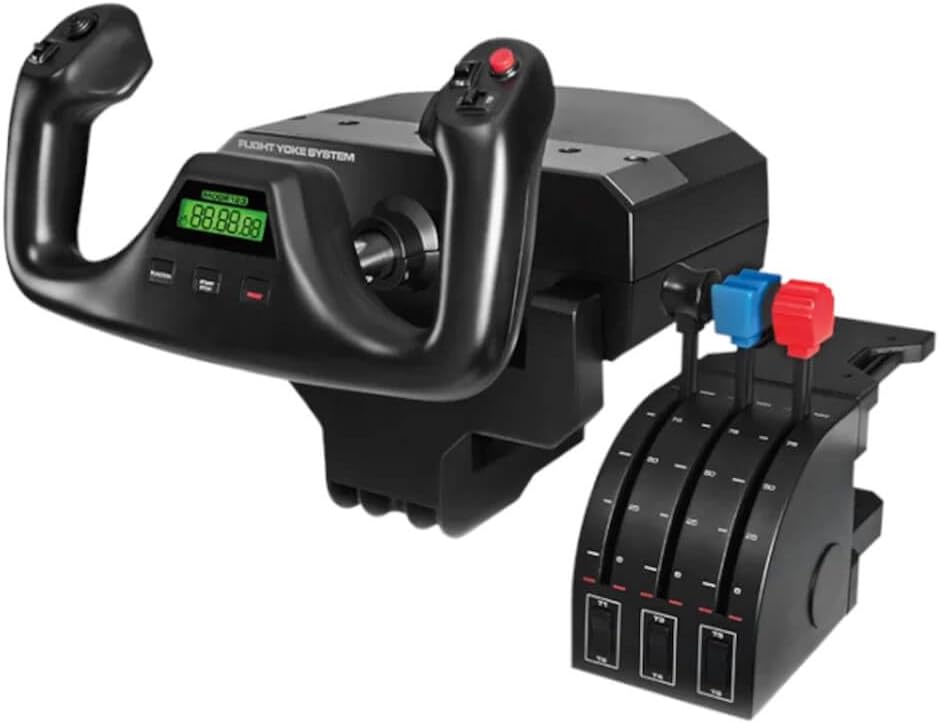
The Logitech G PRO Flight Yoke System offers realistic yoke controls ideal for both new and experienced pilots. It provides a comprehensive setup with a throttle quadrant included in the box.
We may earn a commission when you buy through this link, at no additional cost to you.
The stainless steel yoke shaft ensures robust, smooth, and accurate control of your virtual aircraft. It features a POV hat and 14 button controls with a mode switch for extensive programmability.
While designed primarily for Windows, Mac users can still utilize it with appropriate software configurations. The 2 position desk clamp offers mounting flexibility for a wide range of desks.
This system is perfect for those wanting a full flight deck feel. It balances professional-grade hardware with accessibility for simulation enthusiasts.
Includes a flight throttle quadrant and a 14 button yoke for complete command over your virtual aircraft.
The stainless steel yoke shaft provides durability and smooth movement for a realistic flying experience.
We may earn a commission when you buy through this link, at no additional cost to you.
This bundle combines the Logitech G PRO Flight Yoke System with Pro Flight Rudder Pedals for a complete flight simulation experience. It adds another layer of realistic control to your setup.
We may earn a commission when you buy through this link, at no additional cost to you.
The rudder pedals feature smooth and accurate self-centering with differential toe brakes. They adjust to accommodate a wide range of sizes and include non-slip materials for stability.
Together with the yoke, it offers at least 54 programmable controls for comprehensive aircraft management. The foot rests on the pedals ensure comfort during long sessions.
For a truly immersive setup, this bundle is hard to beat. It provides everything needed to simulate both hand and foot controls effectively.
Differential toe brakes deliver full control for runway maneuvers and precise turning while taxiing.
The bundle combines a yoke and pedals for a full range of aircraft inputs in one package.
We may earn a commission when you buy through this link, at no additional cost to you.
The Turtle Beach VelocityOne H.O.T.A.S. Flight Sim Controls offer an advanced setup for serious pilots with extensive programmable inputs. It features a full-color display for real-time data and performance tuning.
We may earn a commission when you buy through this link, at no additional cost to you.
High-resolution Hall-Effect sensors provide precision for flightstick control, while swappable dual throttle detents deliver tactile thrust reference points. The customizable RGB lighting enhances immersion in your cockpit.
Despite its high-end features, some users report issues with software or setup complexity. The expandable ecosystem supports pedals and mounting solutions for a full cockpit setup.
This HOTAS is designed for those who want top-tier customization. It provides a high degree of flexibility but requires careful configuration to maximize its potential.
The full-color display provides real-time flight data and quick performance tuning directly on the controller.
Adjustable resistance and RGB lighting allow you to tailor the controller to your personal preferences.
We may earn a commission when you buy through this link, at no additional cost to you.
The Logitech G PRO Flight Yoke System offers 75 programmable controls for detailed flight management. It comes with a separate three axis lever throttle and configurable knobs.
We may earn a commission when you buy through this link, at no additional cost to you.
It includes an integrated 1-USB 2.0 Port Hub, simplifying your cable management. The stainless steel yoke shaft and 2-position clamp ensure durability and secure mounting.
With a 3-position mode switch, you can adapt controls for different aircraft or situations. The system is compatible with multiple Windows versions for flexible setup.
This yoke is ideal for those needing versatile control options. It balances functionality with ease of use for various simulation types.
Configurable throttle knobs allow for precise adjustments to manage your aircraft's speed and performance.
The USB 2.0 port hub helps reduce cable clutter by connecting multiple devices through the yoke.
We may earn a commission when you buy through this link, at no additional cost to you.
The Logitech G Saitek PRO USB Flight Yoke System (Renewed) offers a cost-effective way to access professional-grade simulation hardware. It features a stainless steel shaft with ultra-precise bearings for smooth control.
We may earn a commission when you buy through this link, at no additional cost to you.
The dedicated control quadrant includes realistic throttle, prop, and mixture controls along with 14 buttons. It connects via USB 2.0 and supports Saitek's Smart Technology software for customizability.
While renewed items may show minor cosmetic wear, they typically function like new. This unit is ideal for those seeking quality without the full price of a new product.
Choose this option if you want a reliable yoke system at a better value. It brings professional features to your setup efficiently.
This renewed unit offers the professional features of a high-end yoke at a more accessible price point.
The unit includes a digital chronograph perfect for IFR and cross-country procedures.
We may earn a commission when you buy through this link, at no additional cost to you.
Selecting the right flight controller requires considering several factors to ensure compatibility and performance.
Always verify that the device supports macOS or can be run via compatibility tools since many controllers are built primarily for Windows.
Look for explicit macOS mentions or active community patches to ensure smooth operation with your simulators.
Metal shafts and robust plastics indicate a durable unit that will withstand frequent use without wobbling or breaking over time.
A solid build ensures consistent inputs that are essential for realistic and accurate flight simulation experiences.
The more buttons and axes you have, the more functions you can map directly to the controller without relying on keyboard shortcuts.
High programmability is key to mastering complex simulators where quick access to settings can make a huge difference.
Choose a controller that feels comfortable in your hands with adjustable features to prevent fatigue during long simulation sessions.
Proper grip and hand rest design reduce strain and allow for more precise control movements throughout your flights.
Quality software allows for detailed mapping and macros that significantly enhance your ability to customize the device to your needs.
Check for active developer support and driver updates to ensure the device works well with new simulators and systems.
Look for hall-effect or non-contact sensors that provide smoother and more reliable inputs compared to traditional potentiometers over time.
These sensors reduce wear and tear on the device ensuring long-lasting precision for your flight control inputs.
Ensure the controller comes with clamps or suction options that fit your desk setup so it stays secure during intense maneuvers.
A stable mounting system prevents the device from shifting which is crucial for maintaining control accuracy.
Start by installing the latest drivers and mapping software from the manufacturer to ensure full functionality and macOS compatibility.
Calibrate the stick and throttle regularly in your system settings to maintain accuracy and responsiveness over time.
Keep the device clean by wiping down buttons and levers with a soft dry cloth to prevent dust buildup affecting performance.
Most controllers support modern macOS versions but you may need to use compatibility layers or drivers designed for macOS. Always check the specific device requirements before purchasing.
HOTAS stands for Hands On Throttle And Stick and is ideal for combat or fighter sims, while yokes mimic aircraft steering columns better suited for civil aviation.
Yes, many setups allow combining pedals with a stick or yoke via multiple USB ports, but software mapping must be configured carefully to avoid conflicts.
Popular simulators like Microsoft Flight Simulator and X-Plane support macOS, though some require specific versions or compatibility tools to run correctly.
Quality controllers with hall-effect sensors can last many years with proper care, while cheaper potentiometer-based devices may wear out faster with heavy use.
Basic plug-and-play works for essential controls but advanced mapping and features require installing the manufacturer's software for full customization.
VR works well with most controllers but you will need to ensure your setup allows enough physical space for your arms and body to move freely.
The Logitech G Saitek X52 Pro leads with exceptional customization while the Honeycomb Alpha offers premium realism for civil aviation lovers.
Prioritize build quality and software support to ensure your investment lasts and delivers smooth performance in your favorite simulators.
Prices and availability can change quickly so check current listings and compatibility details before finalizing your purchase decision.